What Is an Intranet? A Practical Guide for MSPs
Published
- intranet definition
- what is intranet
- best intranet features
- intranet vs internet
- benefits of intranet

An intranet is a private, internal digital platform that uses standard Internet protocols (TCP/IP, HTTP) to centralize communication, knowledge, and workflows behind permissioned access. Only authenticated users inside your organization can reach it. For MSPs and multi-site enterprises, that distinction carries real operational weight: a well-built intranet gives distributed teams unified access to documentation, cuts tool sprawl by consolidating runbooks, SOPs, and ticketing in one place, and speeds incident coordination across sites. Research shows office workers spend on average 42% of their time collaborating, which means fragmented internal systems directly slow down your operations.
Table of Contents
- What does a modern intranet actually do?
- How does an intranet differ from the internet and extranet?
- Which intranet architecture fits your multi-site operations?
- What integrations and features should your intranet support?
- Security and U.S. compliance: what controls you need
- Governance and adoption: the real risk in intranet projects
- Rollout timeline and cost buckets to budget for
- How should MSPs evaluate intranet software?
- Why network monitoring matters for intranet reliability
- Key Takeaways
- The part most intranet guides skip
- Netverge keeps your intranet infrastructure visible and reliable
- Useful sources and further reading
What does a modern intranet actually do?
Modern intranets are not static file stores. They function as employee experience platforms that unify communication, tools, and knowledge across thousands of users and multiple locations. Core functions include:
- Internal communications: Company-wide announcements, team feeds, and targeted messaging by role or site
- Knowledge management and search: Centralized runbooks, SOPs, and searchable knowledge bases that reduce time-to-find
- Document libraries: Version-controlled policy documents, compliance records, and technical guides
- Workflows and approvals: Automated request routing for HR, IT, and operations processes
- HR self-service: Onboarding materials, benefits info, and directory access without IT involvement
- Collaboration spaces: Team channels, project wikis, and shared workspaces
- IT and incident integration: Linked ticketing queues, incident status pages, and escalation paths
For MSPs managing multiple client environments, the incident integration and runbook functions are the highest-value capabilities. A centralized intranet means your engineers find the right procedure in seconds rather than hunting across email threads and shared drives.
How does an intranet differ from the internet and extranet?
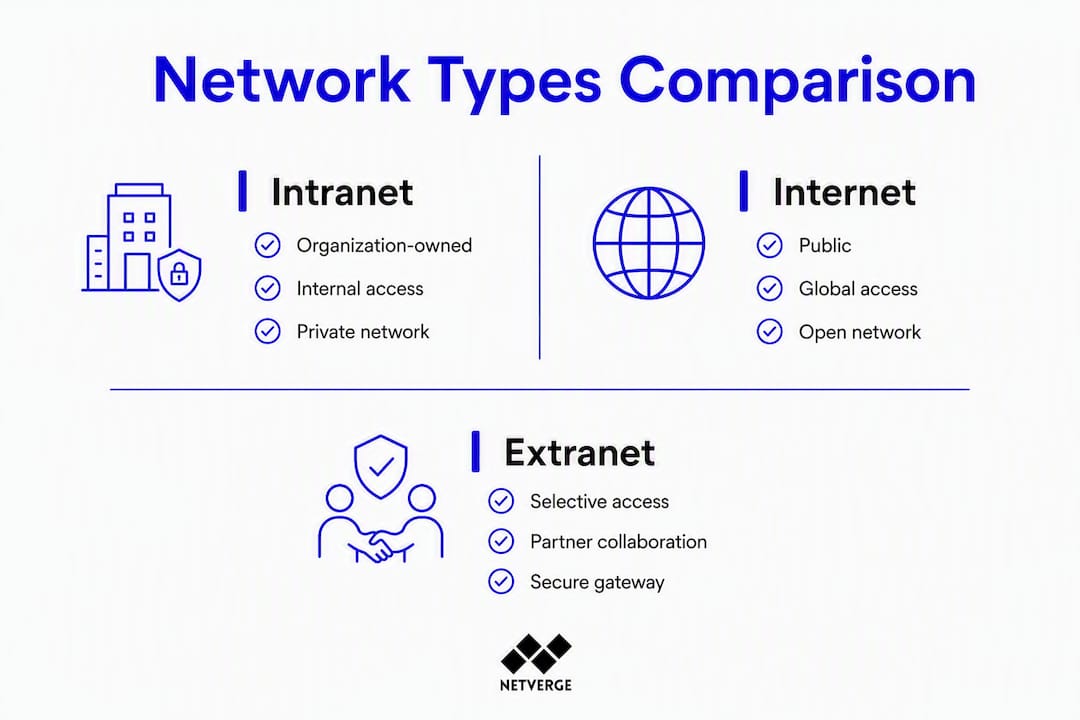
An intranet is private and internally owned. The internet is public and globally accessible. An extranet sits between the two: a controlled extension of the intranet that grants limited, secure access to external partners, typically layered with additional firewalls, VPNs, and partner-specific authentication on top of your existing controls.
The operational distinction that matters: An intranet is a protected enterprise resource you own and control. An extranet is what you build when a vendor or client needs access to a defined subset of that resource. Giving a vendor intranet-level access is a security misconfiguration; giving them extranet access with scoped permissions is the correct model. The authentication and perimeter controls are fundamentally different.
The table below maps the three network types against the dimensions that matter most in an MSP or enterprise context:
| Dimension | Intranet | Internet | Extranet |
|---|---|---|---|
| Ownership | Organization-owned | Public | Organization-owned, partner-accessible |
| Access control | SSO/MFA, RBAC | Open | SSO + VPN/firewall + partner auth |
| Intended audience | Employees only | Anyone | Employees + approved external parties |
| Data class | Internal/confidential | Public | Controlled subset of internal data |
Which intranet architecture fits your multi-site operations?
Architecture choice is where MSPs and enterprise IT leaders make or break long-term scalability. The core tradeoff: cloud-hosted and SaaS options give you faster deployment and lower patching overhead; on-premises gives you tighter data control and lower latency for specific compliance scenarios. Most multi-site enterprises land on a hybrid or SaaS model.

Modern intranets act as middleware using TCP/IP and HTTP to surface disparate legacy systems through a unified interface, which is especially useful for MSPs managing fragmented client environments.
| Architecture | Scalability | Local autonomy | Governance | MSP multi-tenancy | Integration complexity |
|---|---|---|---|---|---|
| On-premises | Low | High | Centralized | Difficult | High |
| Cloud-hosted (private tenant) | High | Medium | Centralized | Moderate | Medium |
| Hybrid | Medium | High | Split | Moderate | High |
| SaaS/EXP | High | Medium | Shared | Depends on vendor | Low–Medium |
Monolithic intranet architectures rarely scale for multi-site operations. The practical approach: separate platform infrastructure from site-level content and admin controls so local teams can operate without creating central bottlenecks.
What integrations and features should your intranet support?
An intranet without deep integrations is just a document portal. The features that drive operational value for MSPs and distributed enterprises are the ones that connect the intranet to the systems your teams already use.
Integration checklist:
- SSO via SAML 2.0 or OAuth 2.0 with MFA enforcement
- User provisioning and deprovisioning via SCIM
- ITSM/ticketing integration (incident creation, status updates, escalation)
- CRM and ERP data surfaces for relevant roles
- Document and version control (SharePoint, Google Drive, or native)
- Directory services (Active Directory, Azure AD, Okta)
- Observability and logging hooks for audit trails
Feature priorities for MSPs: Search and knowledge graph capabilities come first. When an engineer can find the right runbook in under 30 seconds, mean time to resolution (MTTR) drops measurably. Automated workflows and audit logs follow. The single pane of glass model only works when the intranet pulls data from your CRM, ERP, and ITSM rather than duplicating it.
Security and U.S. compliance: what controls you need
Treat your intranet as a protected enterprise resource from day one. Apply the principle of least privilege and implement Zero Trust controls wherever your architecture supports them.
Security checklist:
- SSO with MFA enforced for all users
- Role-based access control (RBAC) scoped to job function and site
- Session timeout and re-authentication policies
- Encryption in transit (TLS 1.2 minimum) and at rest
- Network segmentation isolating intranet services from general traffic
- SIEM integration for log aggregation and anomaly alerting
- Incident log retention aligned to your compliance obligations
U.S. regulatory considerations: HIPAA applies when the intranet stores or surfaces protected health information. SOC 2 Type II is the relevant audit framework for MSPs handling client data. PCI DSS scope expands if payment card data flows through intranet-connected systems. Each of these requires documented access controls, audit logs, and defined retention periods.
Pro Tip: Pair SSO with SCIM-based provisioning from the start. When an employee leaves or changes roles, SCIM deprovisioning removes access across every connected system automatically, closing the account sprawl risk that manual offboarding consistently misses.
Governance and adoption: the real risk in intranet projects
Technology is rarely why intranet projects fail. Governance and content ownership are the most common failure points. Define a RACI and assign local content owners before you write a single line of configuration.
Governance checklist:
- RACI matrix covering content updates, branding, user management, and permissions
- Local vs. global content model: what is centrally owned, what is site-delegated
- Content lifecycle and retention policies with defined review cycles
- Editorial calendar for company-wide communications
- Metadata and taxonomy standards applied consistently across all sites
- Permissions model documented and version-controlled
Pilot and adoption steps:
- Select 1–3 representative sites for the pilot phase
- Identify local champions at each site before launch
- Measure adoption KPIs weekly: active users, search success rate, time-to-find, and local content contributions
- Iterate content templates and taxonomy based on pilot feedback
- Gate the next-site rollout on hitting defined adoption thresholds
Successful multi-site intranets keep shared infrastructure but allow local messaging and cultural tailoring. Central bottlenecks kill engagement; delegated admin models sustain it.
Rollout timeline and cost buckets to budget for
A realistic enterprise intranet project runs from pilot to org-wide adoption over several months, not weeks. Plan for continuous iteration after the initial rollout.
| Phase | Typical Duration |
|---|---|
| Pilot (1–3 sites) | 4 weeks |
| Core integrations (SSO, SCIM, ITSM) | 4 weeks |
| Per-site phased rollout | 2 weeks per site |
| Org-wide adoption and optimization | 3 months |
Core cost buckets:
- Platform licensing or SaaS subscription fees
- Integration and implementation services (SSO, SCIM, ITSM connectors)
- Content migration from legacy systems and shared drives
- Training and change management programs
- Ongoing operations, support, and content governance
ROI metrics worth tracking: time saved per support ticket, reduction in duplicate tool licensing, MTTR improvement tied to faster runbook access, and weekly active user growth as a proxy for productivity impact. Reducing tool sprawl alone often justifies the licensing cost within the first year.
How should MSPs evaluate intranet software?
Evaluate by integration capability first, then multi-tenant and site autonomy support, security posture, governance tooling, and total cost of ownership. Vendors who cannot answer the questions below clearly are not ready for enterprise deployment.
Questions to ask vendors:
- Does the platform support SAML 2.0/OAuth SSO and SCIM provisioning natively?
- What is the multi-tenant isolation model, and can site admins operate independently?
- Where is data stored, and what U.S. data residency options exist?
- What are the backup and disaster recovery SLAs?
- What APIs are available for ITSM, CRM, and observability integrations?
- How is the platform extended for custom workflows or third-party connectors?
Evaluation scorecard (weighted criteria):
| Criterion | Weight | What to assess |
|---|---|---|
| Integration capability | — | SSO, SCIM, ITSM, API coverage |
| Security and compliance | — | RBAC, encryption, audit logs, certifications |
| Multi-site and admin UX | — | Site autonomy, delegated admin, local branding |
| Search and knowledge | — | Full-text search, knowledge graph, relevance tuning |
| Vendor support and SLAs | — | Uptime SLA, response times, escalation paths |
Include uptime SLA (99.9% minimum), search latency, API call success rates, and incident response times in any vendor SLA discussion.
Why network monitoring matters for intranet reliability
An intranet is only as reliable as the network infrastructure beneath it. Undetected outages in authentication services, DNS, or application tiers translate directly into lost productivity and delayed incident response across every connected site.
Operational benefits of pairing network monitoring with your intranet:
- Faster detection of connectivity issues affecting intranet availability at specific sites
- Automatic triage of alerts correlated to the affected application tier (auth, app, storage)
- Correlated logs and metrics that accelerate root cause analysis and reduce MTTR
- Continuous visibility into edge sites where intranet performance issues often originate
Netverge provides real-time infrastructure monitoring with AI-powered anomaly detection and automated triage across distributed environments. Vergepoints, Netverge's plug-and-play edge hardware, instrument on-site network tiers and feed telemetry back to a central dashboard, giving you visibility into exactly which site or service is degraded before users report it. For multi-location IT teams, that edge-to-core observability is what separates proactive operations from reactive firefighting.
Deployment tip: Instrument your intranet's web and application tiers, authentication flows (SSO endpoints), and DNS resolution paths as a baseline. Those three layers account for the majority of user-facing intranet failures.
Key Takeaways
An intranet succeeds when governance, architecture, and network observability are treated as equally critical as the platform itself.
| Point | Details |
|---|---|
| Define governance first | Assign a RACI and local content owners before launch; governance failures outpace technology failures. |
| Match architecture to scale | SaaS or hybrid models suit most multi-site enterprises; on-premises only when compliance demands it. |
| Prioritize SSO and SCIM | Pair them from day one to eliminate account sprawl and automate deprovisioning across all connected systems. |
| Pilot before full rollout | Run a 4 week pilot on 1–3 sites, measure adoption KPIs, and gate the next rollout on hitting those thresholds. |
| Instrument with Netverge | Netverge's edge Vergepoints and AI-powered monitoring protect intranet uptime by detecting site-level failures before users do. |
The part most intranet guides skip
Most intranet guides spend 80% of their words on platform features and almost none on the operational reality that follows go-live. Here is what actually matters once the platform is running.
Local site admins are not a support burden. They are your most important adoption asset. The organizations that treat them as partners, give them real content ownership, and train them properly see sustained engagement. The ones that centralize everything through a single IT admin end up with a stale portal nobody uses within 18 months.
The taxonomy problem is also consistently underestimated. A poorly designed metadata structure means search returns noise, engineers stop trusting the knowledge base, and the intranet reverts to a glorified file share. Spend time on taxonomy before content migration, not after.
One failure mode worth naming directly: a misconfigured RBAC policy that granted a contractor group access to an internal incident channel. The issue went undetected for weeks because there was no monitoring on the authentication tier and no audit log review process. The fix required both a governance correction (tightening the permissions model and adding a quarterly access review) and a technical one (instrumenting the SSO endpoint with real-time alerting). Neither alone would have caught it. That combination of governance discipline and network-level observability is what keeps an intranet operationally sound.
Netverge keeps your intranet infrastructure visible and reliable
Intranet downtime is invisible until it is not. Authentication failures, DNS misconfigurations, and edge-site connectivity drops do not announce themselves. Netverge gives MSPs and multi-site enterprises the AI-powered network observability to detect those failures in real time, correlate them to the affected service tier, and triage automatically before your help desk queue fills up.

Vergepoints deploy at each site to capture local telemetry, while Netverge's knowledge graphs and dashboards surface the full picture centrally. The result: your intranet stays up, your engineers spend less time diagnosing and more time resolving, and your operations stay ahead of failures rather than reacting to them. Request a demo at netverge.com to see how it fits your environment.
Useful sources and further reading
- Wikipedia: Intranet — Authoritative baseline definition, technical architecture, and historical context
- Corporate Intranet Implementation (JAIS) — Academic research on governance, middleware role, and organizational practices
- The Definitive Enterprise Intranet Guide (Unily) — Enterprise framing, employee experience platform model, and integration strategy
- The Modern Intranet: A Guide for IT Teams (Intranet Connections) — Governance checklists, RACI models, and pilot best practices
- Best practices to manage multi-site intranet (LumApps) — Architecture guidance for delegated admin and site autonomy
- Internet, Intranet and Extranet (GeeksforGeeks) — Clear technical comparison of network types and authentication models
- Internal communications for dispersed teams (Ragan) — Adoption tactics and local-global content balance for multinational operations