
Database software, also called a database management system (DBMS), is the program that stores, protects, and serves your data to apps and users on demand. It sits between raw data and the people or programs that need it, handling everything from a single customer record to billions of sensor readings.
Three things anchor how a DBMS earns your trust:
- It enforces data integrity through standards like ACID transactions, so a payment either completes fully or not at all.
- It scales far beyond what a spreadsheet can handle, supporting thousands of simultaneous users through SQL or other query languages.
- It underpins the infrastructure that platforms like Netverge monitor around the clock, because when a database goes down, everything built on it stops working too.
Key Takeaways
Database software works because it enforces integrity, handles concurrent access, and scales far beyond what spreadsheets can manage for production data.
| Point | Details |
|---|---|
| DBMS core job | Stores, retrieves, updates, and protects data while controlling who can access it. |
| Type depends on workload | Relational suits transactions; document, key-value, columnar, and graph suit flexibility and scale. |
| Excel isn't a database | It lacks concurrency control, enforced schema, and transactional integrity for multi-user data. |
| Choose by checklist | Match data model, scale, consistency needs, and team skill before picking a product. |
| Managed cloud reduces ops load | Most major DBMS vendors now offer managed tiers that handle patching and backups. |
Table of Contents
- What Are Database Software Programs Actually For?
- How Does Database Software Work Behind the Scenes?
- What Are the Main Types of Database Software?
- Which Database Software Programs Are Most Common?
- Is Excel a Database?
- What Deployment Options Exist for a Database?
- How Do You Choose the Right Database for a Small Project?
- What Are the Most Common Database Use Cases?
- Why Do Experts Recommend a DBMS Over Spreadsheets for Production Data?
- Why This Explanation Keeps Things Simple
- Where to Learn More About Database Software
- Frequently Asked Questions
- Sources
What Are Database Software Programs Actually For?
A DBMS is the software layer that lets you create, read, update, and delete data reliably, even when hundreds of people touch that data at once. TechTarget defines a database as an organized collection of data accessed through a DBMS, and the DBMS itself provides storage, retrieval, update, backup, and access control.
Every DBMS handles a consistent set of core jobs:
- CRUD operations: creating, reading, updating, and deleting records.
- Transactions: grouping multiple changes so they succeed or fail together.
- Backup and recovery: protecting against hardware failure, corruption, or human error.
- Access control: deciding who can view or change specific data.
- Indexing: speeding up searches on large tables.
- Performance monitoring: tracking slow queries and resource use.
Picture an online store processing an order. A customer clicks "buy," and the DBMS has to deduct one unit from inventory, record the payment, and generate a receipt. If any one of those three steps fails, the transaction rolls back completely so you never end up charging a customer for an item that's actually out of stock.
Pro Tip: If you're evaluating a DBMS for a project, ask specifically how it handles failed transactions. A system that can't cleanly roll back a partial update will eventually corrupt your data during a network hiccup or server crash.
How Does Database Software Work Behind the Scenes?
A DBMS is built from a handful of cooperating parts, not one monolithic block of code. The main components are the storage engine (which writes data to disk in an organized format), the query planner/optimizer (which figures out the fastest way to fetch what you asked for), the transaction log (which records every change for recovery purposes), and the network/API layer (which apps use to talk to the database).
Here's what happens the instant you run a query:
- The DBMS parses your query to check it's valid syntax.
- The optimizer plans several possible ways to execute it.
- It chooses the fastest plan based on table size, indexes, and statistics.
- It executes that plan against the storage engine.
- It returns the results to your application.
A few mechanisms make this fast and dependable at scale:
- Indexing works like a book's index, letting the engine jump straight to relevant rows instead of scanning every record.
- Replication keeps synchronized copies of your data on other servers, so a hardware failure doesn't mean data loss.
- Sharding splits a large dataset across multiple machines, which is how systems handle workloads too big for a single server.
This separation between how data is stored physically and how applications see it logically is called data independence. It's why a database administrator can upgrade hardware or reorganize storage without breaking the applications built on top, a detail worth understanding if you're responsible for monitoring server performance across a fleet of machines.
What Are the Main Types of Database Software?
Not every database organizes data the same way, and picking the wrong model is one of the most common mistakes beginners make. DigitalOcean's breakdown of database types classifies systems by data model, storage architecture, and query approach, and the right choice always depends on your workload.
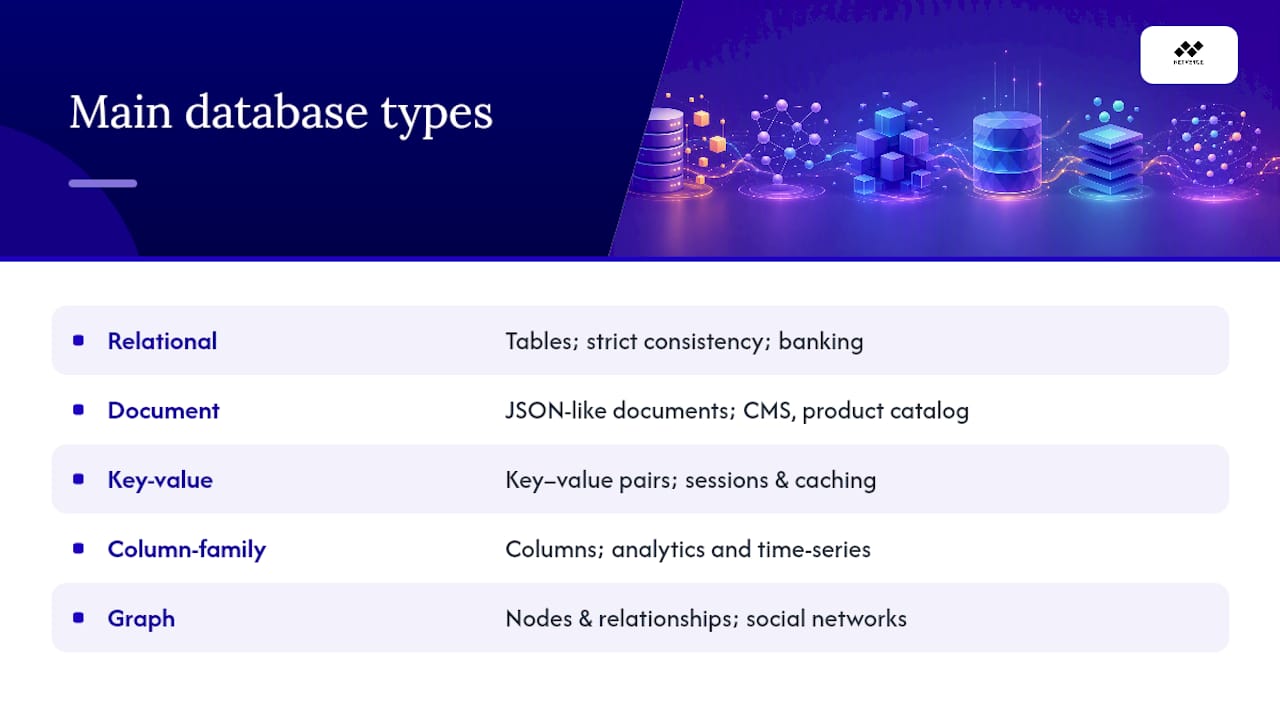
Relational databases store data in tables with rows and columns, linked by keys. Best for: financial systems and anything needing strict consistency, like banking transactions.
Document databases store records as flexible, JSON-like documents rather than rigid rows. Best for: content management systems where each item has different attributes, like a product catalog.
Key-value stores pair a unique key with a value, with no fixed schema at all. Best for: session storage and caching, where you need to fetch data by a single lookup instantly.
Column-family (columnar) databases store data by column instead of by row, which speeds up queries touching millions of records at once. Best for: analytics workloads and time-series data, like tracking metrics across thousands of devices.
Graph databases store data as nodes and relationships, making connections the primary citizen instead of an afterthought. Best for: social networks and recommendation engines, where "who's connected to whom" is the actual question.
Time-series databases are optimized specifically for timestamped data points arriving in high volume. Best for: IoT sensor readings and infrastructure metrics.
Multimodel databases support more than one of the above models inside a single engine. Best for: teams that want to avoid running five separate database systems for five separate problems.
The SQL vs. NoSQL distinction, in one line: SQL (relational) databases prioritize strict consistency and structured relationships; NoSQL databases (document, key-value, column, graph) prioritize flexibility and horizontal scale. Neither is universally "better," they solve different problems.
Pro Tip: Don't pick a database type based on what's trendy. A team building a simple invoicing app that reaches for a graph database because it sounds sophisticated will spend more time fighting the tool than shipping features.
Distributed SQL (sometimes called NewSQL) has emerged specifically to blend relational consistency with the horizontal scaling that NoSQL systems are known for, a trend worth watching if your application is expected to grow well beyond a single server.
Which Database Software Programs Are Most Common?
Ten names come up constantly once you start researching database software, and recognizing them helps you follow technical conversations and vendor documentation without getting lost.
- MySQL: an open-source relational database widely used in web applications, from small blogs to large-scale platforms.
- PostgreSQL: an open-source relational database known for strong standards compliance and advanced features for transactional workloads, according to PostgreSQL's own documentation.
- MongoDB: a document database that stores flexible, JSON-style records, popular for applications with evolving data structures.
- Microsoft SQL Server: a commercial relational database built for enterprise environments, often paired with Windows infrastructure.
- Oracle Database: a commercial relational database used heavily in large enterprises with complex, mission-critical workloads.
- SQLite: a lightweight, embedded SQL database that runs without a separate server process, ideal for local storage and prototyping.
- Redis: an in-memory key-value store used primarily for caching and session data where speed matters more than complex queries.
- Apache Cassandra: a columnar database designed for massive scale across distributed clusters, common in large analytics pipelines.
- Amazon DynamoDB: a fully managed key-value and document database built for serverless applications on AWS.
- Neo4j: a graph database purpose-built for relationship-heavy queries, like fraud detection or recommendation systems.
Most of these offer a managed cloud version, so you don't have to run and patch the server yourself.
If you already know your model from the section above, the product choice narrows fast: PostgreSQL or MySQL for relational needs, MongoDB for documents, Redis for caching, Neo4j for relationships. Wikipedia's overview of DBMS types confirms this pattern across vendor documentation, too.
Is Excel a Database?
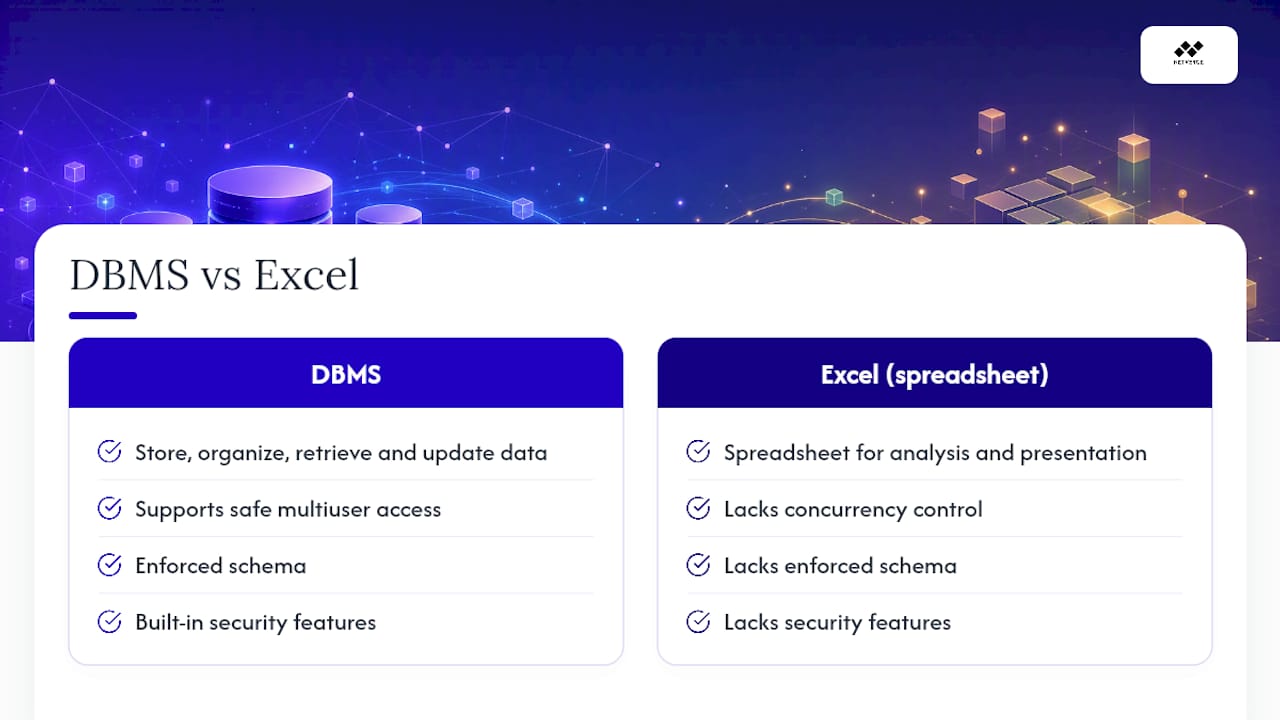
No. Excel is a spreadsheet application, not a database management system, and Microsoft itself draws this line clearly. Microsoft's own guidance recommends Excel for analysis and presentation, while pointing users toward Access (or another true DBMS) once multiple people need to work with structured, related data.
Here's where spreadsheets fall short compared to a real DBMS:
- Scalability: Excel struggles well before large datasets; a DBMS handles datasets far beyond spreadsheet limits.
- Concurrency: two people editing the same spreadsheet risk overwriting each other's work; a DBMS manages simultaneous access safely.
- Schema and constraints: Excel won't stop you from typing text into a number field; a DBMS enforces data types and relationships.
- Security: spreadsheet permissions are coarse and easy to bypass; a DBMS supports row-level and role-based access control.
- Backups and auditability: a DBMS logs every change automatically; a spreadsheet's version history is a poor substitute.
A file-based tool like Excel simply wasn't built to be the single source of truth for a production system. HowToGeek's practical breakdown points to weak concurrency, missing transactional integrity, and thin security as the recurring failure points once teams try to scale a spreadsheet into a shared system.
Think of a food delivery app. If order data lived in a shared spreadsheet, two drivers could get assigned the same order simultaneously, and there would be no automatic way to prevent it. A DBMS locks that record the instant one driver accepts it, so a database, not a workbook, is what actually keeps that experience reliable.
What Deployment Options Exist for a Database?
You have four broad choices for where your database actually runs, and each comes with a different operational burden.
- On-premises: your own hardware in your own building, giving full control but full responsibility too.
- Self-hosted cloud VMs: you install and manage the DBMS software yourself on a rented cloud server.
- Managed database services: the vendor handles patching, backups, and scaling; you manage the data and schema.
- Serverless database platforms: capacity scales automatically with usage, and you pay only for what you consume.
Whichever model you pick, the operational checklist stays the same: backups, security updates, scaling as demand grows, monitoring for slow queries or downtime, and clear service-level agreements (SLAs) for uptime. Most major DBMS vendors, from PostgreSQL to SQL Server, now offer a managed cloud tier specifically to take that operational load off your team. That shift matters because fragmented tools and disconnected systems create blind spots that are hard to catch until something breaks in production, which is exactly the kind of gap unified network management features are designed to close.
How Do You Choose the Right Database for a Small Project?
Run through this checklist before writing a single line of code:
- What data model fits your data (tables, documents, key-value pairs, graphs)?
- How much scale do you realistically expect in year one versus year three?
- Is your workload read-heavy, write-heavy, or a mix of both?
- Do you need strict transactional consistency, or is eventual consistency acceptable?
- What does your team already know how to use and support?
- What latency do users expect, and does that rule anything out?
- What's your budget for a managed service versus self-hosting?
A few quick mappings to ground this: a small personal blog fits comfortably on SQLite or a small managed relational database. A product catalog with wildly different attributes per item points toward a document database like MongoDB. A real-time leaderboard or session cache calls for a key-value store like Redis.
Start prototyping with something lightweight like SQLite, but plan your graduation path early. Moving from a spreadsheet straight into a production DBMS, rather than limping along with a shared Excel file, is what actually protects your data as your project grows.
What Are the Most Common Database Use Cases?
Most real systems fall into a handful of recurring patterns, and matching the pattern to the database family saves you a rewrite later.
- Transactional apps (banking, e-commerce checkout) fit relational databases, thanks to ACID guarantees.
- Analytics and data warehousing fit columnar databases, built for scanning huge datasets fast.
- Caching and session storage fit key-value stores, prized for near-instant lookups.
- Product catalogs with variable attributes fit document databases.
- Social graphs and recommendations fit graph databases, where relationships are the point.
- IoT and infrastructure metrics fit time-series databases, built for high-volume timestamped writes.
- Application and security logging often fits columnar or document stores, depending on query patterns.
Many production systems actually combine several of these, a practice called polyglot persistence, using a relational database for orders and a key-value cache for sessions in the same application.
Why Do Experts Recommend a DBMS Over Spreadsheets for Production Data?
The evidence against relying on spreadsheets for anything mission-critical is consistent across independent sources, not just marketing claims.
- Excel hits practical size and performance limits well before enterprise datasets do, and HowToGeek documents weak concurrency and missing transactional integrity as recurring failure points.
- A DBMS's ACID properties guarantee that transactions complete fully or not at all, something spreadsheets have no mechanism to enforce.
- Automated backup and recovery in a DBMS protects against the kind of accidental overwrite that plagues shared spreadsheets.
- Role-based access control and audit logs give administrators visibility that spreadsheet permissions can't match.
- Microsoft's own comparison confirms Excel is meant for analysis, not as the system of record for multi-user data.
If more than one person touches the data, or the data drives revenue, a DBMS should be your source of truth, not a workbook.
Why This Explanation Keeps Things Simple
Database concepts get buried in jargon fast, and that gatekeeping doesn't actually serve anyone learning the basics for the first time. The goal here was to demystify what a DBMS does without pretending you need a computer science degree to understand transactions, indexing, or the difference between a document store and a graph database.
If you want a next step, pick one of three starting points: install SQLite locally for a weekend project, spin up a managed free-tier relational database to test a real application, or try a key-value cache like Redis if performance under load is your actual concern. Whichever you choose, understanding these fundamentals also makes you better equipped to evaluate the infrastructure tools, including platforms like Netverge, that keep the databases behind your applications healthy.
Where to Learn More About Database Software
- Using Access or Excel to manage your data — Microsoft Support: official Excel vs. Access comparison.
- Why I never use Microsoft Excel as a database — HowToGeek: practical spreadsheet limitations.
- Database types tutorial — DigitalOcean: data model and architecture breakdown.
- Types of DBMS — Wikipedia: overview of common DBMS products.
- PostgreSQL official site: relational database documentation.
- SQLite official site: embedded database use cases.
- Different types of DBMS explained — TechTarget: workload-driven database selection.
- How to use Excel like a database — Statology: when to connect Excel to a real backend.
- Data Governance Software: A Comprehensive Guide 2026 — PlotStudio AI: governance concepts for data as a system of record.
- Explore Netverge's AI-powered network monitoring platform to see how infrastructure visibility supports the databases your applications depend on.
Frequently Asked Questions
What is database software in simple terms? Database software, or a DBMS, is the program that stores your data, keeps it organized, and lets applications or people retrieve and update it safely, even when many users access it at once.
What are some examples of database software? Common examples include MySQL, PostgreSQL, MongoDB, Microsoft SQL Server, Oracle Database, SQLite, Redis, Apache Cassandra, Amazon DynamoDB, and Neo4j, each built around a different data model.
Is Excel considered database software? No. Excel is a spreadsheet tool for analysis and presentation. It lacks the concurrency control, enforced schema, and security features that define a true DBMS, according to Microsoft's own guidance.
What is a relational database? A relational database stores data in tables made of rows and columns, linked together through keys. MySQL, PostgreSQL, SQL Server, and Oracle Database are all relational systems.
What are the top database types beginners should know? The main types are relational, document, key-value, columnar, graph, and time-series. Each organizes data differently and fits different use cases, from banking transactions to social network connections.
How do I choose database software for a small business? Start by identifying your data model, expected scale, and how many people need simultaneous access. A small business tracking simple records often does well with a managed relational database, while flexible product catalogs may fit a document database better.
Ready to see how solid infrastructure monitoring keeps the databases behind your applications running smoothly? Explore Netverge's platform to unify visibility across your network.