Out-of-band monitoring (OOBM) is a dedicated, physically separate path that delivers traffic copies or a management channel independent of your production network, so you retain admin access and visibility even when the primary network fails completely. According to CBT Nuggets, this separation is what guarantees access during routing failures, security incidents, or total link loss. Think of in-band as the front door for routine operations and out-of-band as the master key you reach for when that door is locked.
When your production network goes dark, OOB gives you three immediate capabilities:
- Serial console access to devices regardless of OS or network state
- Full-packet capture via passive TAPs for forensic and compliance use
- Cellular failover that keeps the management plane reachable when wired paths fail
Key Takeaways
Out-of-band monitoring is a resilience-critical architecture that preserves admin access, enables lossless forensic capture, and keeps incident response communications independent of the production network.
| Point | Details |
|---|---|
| OOB is a resilience lifeline | A dedicated, separate management path keeps you in control when the production network fails or is compromised. |
| Use TAPs for passive capture | TAP-based monitoring is lossless and preserves timing and error frames; SPAN ports drop packets under load and are unreliable for forensics. |
| Harden OOB channels rigorously | Apply MFA, RBAC, credential rotation, and session recording to OOB interfaces — they are high-value targets for attackers. |
| Test readiness continuously | Schedule recurring SIM health checks, connectivity tests, and power-control validation; backup paths that are never tested routinely fail during incidents. |
| Netverge unifies both planes | Netverge's Vergepoints and AI-powered platform consolidate in-band telemetry and OOB readiness monitoring into a single, multi-tenant management interface. |
Table of Contents
- What does out-of-band monitoring actually include?
- How does out-of-band monitoring work at a technical level?
- Where does OOB deliver the most operational value?
- In-band vs. out-of-band: which approach fits your workload?
- How do you harden an OOB channel against attack?
- OOB deployment checklist: from audit to production
- What features should you evaluate in an OOB solution?
- Why OOB communications matter during incident response
- The case for a dual-plane architecture
- Netverge gives your OOB infrastructure a single management plane
- Sources
What does out-of-band monitoring actually include?
The term covers two related but distinct disciplines. Monitoring means passively copying traffic to analysis tools without touching the live path. Management means remotely controlling hardware through a dedicated channel separate from the data plane. Both rely on the same architectural principle: the management and monitoring infrastructure must survive independently of what it observes.
Core components
- Network TAPs (fiber and copper): Passive devices that create an exact copy of traffic. Passive fiber TAPs add zero latency and keep working through power loss. Active Ethernet TAPs include fail-safe bypass modes to protect link availability if the TAP itself loses power.
- Network packet brokers (NPBs): Aggregate, filter, and deduplicate traffic from multiple TAPs before forwarding to monitoring tools. At scale, packet brokers are essential for reducing tool overload and keeping storage costs manageable.
- Console servers / serial consoles: Provide RS-232 serial access to routers, switches, and servers. The management channel stays live even when the device OS is unresponsive.
- BMC / iLO / Redfish / IPMI: Baseboard Management Controllers and their vendor equivalents (HPE iLO, Dell iDRAC) give you remote access to devices even when the OS is down or the device is powered off, including BIOS-level control and remote power cycling.
- KVM-over-IP: Keyboard, video, and mouse access delivered over IP to a remote console, independent of the server's OS.
- Remote PDUs: Intelligent power distribution units that let you cut and restore power to individual outlets remotely.
- Cellular / WWAN / satellite modems: Provide the out-of-band transport layer when wired WAN links fail. LTE and 5G are the most common; satellite covers sites where cellular is unavailable.
- OOB management appliances: Dedicated hardware that bundles console server, cellular modem, and management software into a single unit for branch or remote-site deployments.
Standard protocols and interoperability
SNMP remains the baseline for device status polling across OOB appliances. NetFlow and sFlow feed traffic telemetry to analysis platforms. Redfish is the modern RESTful API standard for server hardware management, replacing legacy IPMI in newer server generations. IPMI persists across older infrastructure and is still widely deployed. Interoperability between these protocols matters: your centralized management platform needs to speak all of them, or you end up with visibility gaps at the hardware layer.
How does out-of-band monitoring work at a technical level?
The architecture breaks into three stages: access, copy, and deliver.
Access is where TAPs and console ports sit physically on the links and devices you need to observe or control. A TAP is installed inline on a network segment; it passes traffic normally while simultaneously sending a copy to a monitoring port. Console servers connect to the serial management ports of routers, switches, and servers.
Copy is the TAP's job. TAP-based capture is lossless, preserving packet timing and physical-layer errors that SPAN ports routinely drop under load. SPAN ports are convenient but unreliable for forensics: they can silently discard packets when the switch CPU is busy and they filter out error frames by design. For compliance-grade capture, TAPs are the correct choice.
Deliver is where packet brokers aggregate traffic from multiple TAPs, apply filtering and deduplication, and forward clean streams to IDS sensors, SIEM collectors, or packet capture appliances. The monitoring tools never touch the live path.
Inline vs. out-of-band placement
Inline tools (IPS, next-generation firewalls) sit directly in the traffic path and can block or modify packets. Out-of-band tools receive a copy and can only observe. Bypass TAPs protect inline tools: if the inline device fails or loses power, the bypass TAP closes the circuit and keeps the link up. This is a critical design detail for any inline security deployment.
Management access paths
For the management plane, connection methods include:
- Serial console (RS-232) via console server, always available regardless of IP reachability
- Dedicated out-of-band Ethernet management ports on servers and network gear, physically separate from data interfaces
- Cellular backhaul providing IP connectivity to the management plane when the primary WAN is down
- Jump hosts / bastion servers on the OOB network, accessed via VPN or a dedicated OOB access plane
Authentication on the OOB plane deserves the same rigor as production: multi-factor authentication, role-based access control, and session recording are non-negotiable. The management plane is a high-value target precisely because it bypasses normal network controls.
Where does OOB deliver the most operational value?
Data center recovery and BIOS-level access
When a server kernel panics or a firmware update bricks a device, BMC and iLO interfaces let you access the hardware at the BIOS level and cycle power remotely. Without OOB, that scenario requires a physical hands-on visit. With it, recovery can start in minutes from anywhere.

Branch and remote-site management for MSPs
Out-of-band management separates the management infrastructure from the production network so MSPs maintain console access and remote power control even when a branch site's WAN link drops. That directly reduces truck rolls, which are one of the highest-cost line items in MSP operations. For tips on managing distributed environments at scale, see Netverge's guidance on managing distributed networks.
Forensic packet capture and compliance
Regulated industries require full-packet archives with verified chain of custody. TAP-based capture provides a lossless, tamper-evident record that SPAN-based collection cannot reliably match. Out-of-band monitoring is the preferred approach for SIEM ingestion, IDS, and forensic capture precisely because it introduces no risk to the production traffic path.
Incident response communications
During a breach, the production network itself may be compromised or under attacker control. An independent OOB communications channel lets your team coordinate recovery without relying on infrastructure the attacker may be monitoring. This is covered in depth in the security section below.
Cellular failover at the edge
When a branch WAN link fails, cellular backup keeps the management plane reachable. Continuous readiness monitoring for wireless failover, including SIM health checks and proof-of-performance tests, converts backup connectivity from an assumption into a measurable, SLA-backed capability.
In-band vs. out-of-band: which approach fits your workload?
The decision is straightforward once you map the workload to the tool's capabilities.
| Dimension | In-band | Out-of-band |
|---|---|---|
| Risk to production traffic | Can introduce latency or failure | None — copy only |
| Ability to block/modify traffic | Yes (IPS, NGFW) | No — passive observation |
| Packet capture completeness | Partial (SPAN drops under load) | Lossless with TAPs |
| Survives production outage | No | Yes |
| Compliance-grade forensics | Unreliable | Reliable |
Use out-of-band when: you need passive observation, SIEM data collection, IDS (not IPS), forensic capture, compliance archiving, or resilient management access. OOB is the dominant approach for passive analysis workloads in regulated industries for exactly this reason.
Use in-band when: the tool must actively block or modify traffic. An IPS, a next-generation firewall, or a WAF must sit inline. There is no out-of-band equivalent for active enforcement.
A practical example: your SIEM ingests NetFlow and full-packet data via an OOB TAP feed. Your IDS sensor receives a copy of the same TAP stream. Your IPS sits inline, protected by a bypass TAP. All three coexist; the choice of placement follows the tool's function, not a single architecture preference.
How do you harden an OOB channel against attack?
OOB infrastructure is a high-value target. An attacker who compromises your console server or BMC has the same access you do during a recovery scenario. These controls reduce that risk without sacrificing availability.
Access controls and authentication
- Enforce multi-factor authentication on all OOB management interfaces, including BMC, console servers, and KVM-over-IP.
- Apply strict role-based access control (RBAC): operators get read-only console access; senior engineers get power control; only a small group gets firmware and credential management.
- Implement just-in-time access for privileged sessions so standing access to OOB interfaces is minimized.
- Remove all vendor default credentials immediately on deployment. BMC and iDRAC defaults are publicly documented and actively exploited.
Network segmentation and isolation
Physically and logically separate the OOB management network from the production data plane. A dedicated management VLAN is a minimum; a physically separate management network is better for high-security environments. Use TLS for all web-based management interfaces and IPsec for management tunnels over cellular backhaul. Never route OOB management traffic across the production network.
For MSPs, network security practices that include independent communication methods and incident response controls are increasingly a client expectation, not just a best practice.
Credential management
Rotate BMC, iDRAC, and iLO credentials on a defined schedule and manage them through a privileged access management (PAM) vault rather than shared spreadsheets. Audit credential access logs regularly. Each client environment at an MSP should have unique OOB credentials; shared credentials across tenants create lateral movement risk.
Logging and auditing
- Record all console and KVM sessions in full, with timestamps and user attribution.
- Store packet captures and session logs outside the production network, on immutable storage where possible.
- Forward OOB management logs to a centralized SIEM that is itself on the OOB or a separate management network.
Pro Tip: Schedule a quarterly OOB readiness test: verify cellular SIM health, confirm console server connectivity to every managed device, and test remote power cycling on at least one device per site. Backup paths that are never tested routinely fail at the worst possible moment.
OOB deployment checklist: from audit to production
Step-by-step rollout
- Audit critical links and devices. Identify every link and device where an outage would require physical access or cause an SLA breach. Prioritize core routers, distribution switches, WAN edge devices, and critical servers.
- Select TAPs and console servers. Choose passive fiber TAPs for high-speed links where zero-latency capture is required. Use active Ethernet TAPs with fail-safe bypass for links where inline tool protection matters. Size console servers to cover all serial management ports at each site.
- Design the management network. Define the OOB management VLAN or physical segment, IP addressing, and routing policy. Document access paths: which jump host or bastion server provides entry, and how cellular backhaul connects to the management plane.
- Procure cellular failover hardware. Select LTE or 5G gateways with multi-carrier SIM support for sites where WAN redundancy is critical. Confirm carrier coverage at each location before procurement.
- Install, cable, and configure. Rack TAPs and console servers, connect serial cables, configure BMC interfaces, and validate cellular modem registration. Apply hardening controls (MFA, RBAC, credential rotation) before connecting to production.
- Integrate with monitoring and automation tools. Connect TAP feeds to packet brokers and then to IDS, SIEM, and packet capture platforms. Register console servers and BMC interfaces in your centralized management platform. Configure alerting for OOB link failures and SIM health events.
- Test and validate. Simulate a production outage: disconnect the primary WAN link and confirm that console access, cellular failover, and remote power control all function correctly. Document results as your baseline proof-of-performance.
- Establish a maintenance schedule. Continuous readiness monitoring prevents set-and-forget failures. Schedule recurring connectivity tests, SIM health checks, and credential rotation.
Timeline estimates
A single-site deployment (console server, one or two TAPs, cellular gateway) typically takes two to four weeks from procurement to validated production, including staging and testing. A multi-branch rollout across ten to twenty sites runs eight to sixteen weeks when sites are staged in parallel. An enterprise data center deployment with full TAP coverage, packet broker integration, and BMC management for hundreds of servers is a three-to-six-month project, with procurement and staging consuming roughly half that time.
Cost considerations
Hardware costs vary by scale: passive TAPs run from a few hundred dollars per unit for copper to several thousand for high-speed fiber. Console servers range from under $1,000 for small branch units to $5,000 or more for high-density data center models. Cellular gateways add $300–$800 per site plus monthly data plan costs. Centralized management software licensing is typically subscription-based and scales with the number of managed devices. Labor for installation, testing, and documentation is often the largest single cost at multi-site scale. Hardware-driven monitoring approaches that consolidate visibility into a single platform reduce ongoing operational overhead significantly.
What features should you evaluate in an OOB solution?
Not all OOB platforms are equal. Map these capabilities to your operational requirements before committing to a vendor.
- KVM-over-IP and full console access: Verify that the solution provides both serial console and KVM access, not just one. Serial handles network gear; KVM handles servers.
- Remote power control: PDU integration or built-in outlet control is non-negotiable for true remote recovery. Confirm granularity: per-outlet control, not just per-PDU.
- Cellular failover with multi-carrier support: Single-carrier cellular is a single point of failure. Dual-SIM or multi-carrier support improves resilience at sites where one carrier has spotty coverage.
- Session recording and audit trails: Full session recording with user attribution satisfies compliance requirements and supports post-incident forensics. Confirm that logs are stored outside the production network.
- Multi-tenant RBAC: For MSPs, per-client role isolation is mandatory. Confirm that the platform enforces tenant boundaries at the data and access layer, not just the UI.
- API and automation hooks: REST APIs and webhook support let you integrate OOB actions into runbooks, ticketing systems, and orchestration platforms. Confirm support for the automation tools already in your stack.
- Packet capture integration: If forensic capture is a requirement, verify that the platform supports TAP feed aggregation and integration with packet capture or SIEM tools.
- Redfish and IPMI support: Modern servers use Redfish; older infrastructure uses IPMI. A platform that supports both avoids a two-tool management problem.
- Centralized management UI with alerting: A single pane of glass for all OOB assets, with integrated alerting for connectivity failures, SIM events, and credential expiry, reduces the operational burden of managing distributed OOB infrastructure.
- Proof-of-performance monitoring: The platform should actively test backup paths and report their status, not just assume they are working. Real-time monitoring methods that include continuous readiness checks are what separate a managed OOB solution from a set-and-forget appliance.
For enterprise-scale deployments, also evaluate support for passive fiber TAPs, packet broker integration, SPAN fallback for environments where TAPs cannot be installed, and SNMP/NetFlow/sFlow interoperability with existing network management platforms. Security monitoring integration, including LLM-based monitoring tools for enterprise SOCs, is an emerging consideration as AI-assisted threat detection becomes more common in larger environments.
Why OOB communications matter during incident response
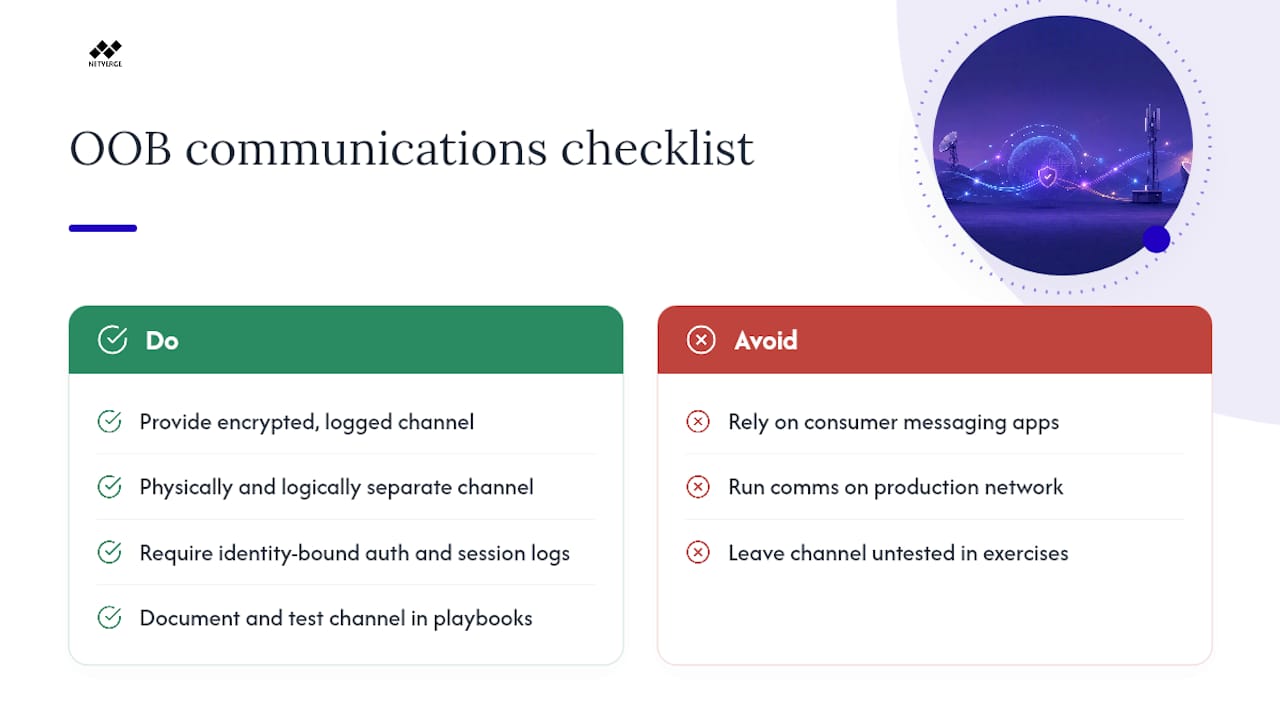
When a ransomware attack or major breach hits, the production network is often the attacker's territory. They may be monitoring email, Slack, and Teams. Enterprise-grade out-of-band communications are increasingly critical for incident response; consumer messaging apps create retention and compliance liabilities, and they run on the same infrastructure the attacker may control.
The operational requirement is an encrypted, logged, policy-managed communications channel that is physically and logically separate from the production environment. This channel needs to support identity verification: during a breach, impersonation of IT staff or executives is a documented attacker technique. An OOB comms platform with session logging and identity-bound authentication removes that attack surface.
For MSPs, this is a high-value service opportunity. Offering a managed OOB communications and recovery channel, with defined SLAs for availability, documented retention policies, and audit-backed logs, addresses a compliance gap that most clients have not solved. Package it with your existing OOB management infrastructure: the cellular backhaul and console server network you already manage can host the communications channel. Include retention period, log export capability, and identity verification steps in the service description, and you have a differentiator that speaks directly to compliance buyers.
Pro Tip: For MSPs building this service, document the OOB comms channel in your incident response playbook and test it during tabletop exercises. A channel that exists but is unfamiliar to the team under pressure provides far less value than one that has been rehearsed. See the network incident response guide for a practical playbook framework.
Ransomware operators increasingly maintain persistence for weeks before triggering encryption. During that dwell time, they map your communications infrastructure. An OOB channel that was provisioned and tested before the incident is the one that actually works when you need it.
The case for a dual-plane architecture
The most resilient operations treat in-band and out-of-band as complementary planes, not competing options. In-band handles routine monitoring, configuration pushes, and performance telemetry. Out-of-band is the mandatory recovery layer that activates when the production plane fails or is compromised.
The operational priorities for this architecture are straightforward: continuous readiness checks on OOB paths, integrated automation that can trigger failover and remediation without manual intervention, and documented playbooks that explicitly include OOB steps for every major failure scenario. An OOB infrastructure that is not in the playbook is infrastructure that will not be used correctly under pressure.
A unified visibility platform simplifies managing both planes. When your in-band monitoring, OOB management, and readiness testing all feed into a single interface, you can validate the health of both planes from one place and correlate events across them. That correlation is what turns an OOB alert into an actionable recovery workflow rather than a separate, disconnected signal.
Netverge gives your OOB infrastructure a single management plane
Fragmented OOB tools create exactly the visibility gap they are supposed to prevent. Netverge addresses that directly: Vergepoints deploy at the edge to provide hardware-driven, on-site visibility across distributed sites, feeding telemetry into a centralized platform that combines AI-assisted anomaly detection, automated troubleshooting, and proof-of-performance monitoring in one interface.

For MSPs, Netverge's multi-tenant monitoring platform enforces per-client role isolation, supports 28+ intelligent sensors, and integrates with major network and cloud vendors so your OOB readiness checks and in-band telemetry share the same dashboard. AI agents diagnose issues automatically and triage tickets, reducing mean time to resolution and cutting the truck rolls that erode MSP margins. If you manage multi-location enterprises, the Netverge monitoring platform gives you the continuous readiness validation and centralized control your OOB architecture needs to function as a real recovery lifeline, not a backup you hope works when it matters.
Sources
The following references provide deeper technical detail on OOB standards, hardware, and deployment patterns: