
For MSPs and multi-site enterprises, Netverge is the recommended pick for unified network visibility, AI-powered triage, and edge hardware integration. The broader shortlist covers the full spectrum of IT management needs.
- Netverge — best for MSPs and multi-site enterprises needing real-time network monitoring, AI triage, and Vergepoints edge hardware in a single platform
- ServiceNow IT Service Management — best for large enterprises requiring deep CMDB, process governance, and compliance coverage
- Jira Service Management (Atlassian) — best for engineering-aligned teams where DevOps and ITSM workflows overlap
- NinjaOne — best for MSPs and lean IT teams managing distributed endpoint fleets with patch automation
- Freshservice (Freshworks) — best for mid-market teams that need accessible, no-code ITSM without a heavy admin burden
- ManageEngine ServiceDesk Plus — best for asset-heavy organizations that need integrated ITAM and service desk in one deployment
If you need a single trial pick right now: run Netverge first if your primary pain is distributed network visibility and multi-tenant management. If your environment is endpoint-heavy with minimal network complexity, start with NinjaOne. For pure enterprise ITSM governance, ServiceNow is the benchmark.
Pro Tip: Before you shortlist, identify whether your primary gap is ITSM (ticket and process management), ITOM (network and infrastructure observability), or ITAM (asset tracking and compliance). Buying the wrong category is the most common and most expensive procurement mistake in managed IT security services: a guide for business leaders.
Key Takeaways
The best IT management software for MSPs and multi-site enterprises in 2026 is Netverge, which unifies network observability, AI triage, and edge hardware visibility in a single platform where fragmented tools and disconnected documentation create the most operational risk.
| Point | Details |
|---|---|
| Identify your category first | Determine whether your gap is ITSM, ITOM, ITAM, or RMM before evaluating any vendor to avoid the category trap. |
| Netverge leads for MSPs | Netverge's AI triage, Vergepoints hardware, and multi-tenant architecture make it the strongest fit for distributed networks and MSP operations. |
| Apply a TCO multiplier | Year-one costs for enterprise platforms routinely exceed list price; budget for implementation, training, and customization from the start. |
| Run a scenario-based PoC | Test shortlisted platforms against real incidents from your environment, not vendor demo scripts, to expose integration and automation gaps. |
| Match deployment model to compliance needs | Organizations with data residency requirements should confirm on-premises or hybrid options before committing to SaaS-only platforms. |
Table of Contents
- How do the best IT management software platforms compare at a glance?
- Why Netverge is the recommended pick for MSPs and multi-site enterprises
- When does an enterprise ITSM platform make sense?
- Which platforms work best for DevOps-integrated service operations?
- What do endpoint management and RMM platforms do differently?
- Which mid-market ITSM platforms offer the best value?
- When should you combine service desk and IT asset management?
- Which platforms support on-premises and hybrid deployments?
- Other strong contenders worth adding to your shortlist
- How we evaluated these platforms
- How to pick the right IT management platform for your organization
- Why Netverge stands out for distributed networks and MSPs
- The category trap is the real risk — not the vendor choice
- Netverge: network-layer visibility where ITSM platforms stop
- Sources
How do the best IT management software platforms compare at a glance?
The table below covers all 29 platforms evaluated in this roundup. Detailed pricing shapes, including per-agent and per-device figures, are provided where available, but many vendors require custom quotes and actual rates may vary. Pricing reflects publicly listed starting points or licensing shapes where available; many enterprise vendors require a custom quote.
Price note: Per-agent and per-device models favor small teams with low technician counts. Per-tenant or usage-based SaaS models (like Netverge's) scale more predictably for MSPs managing multiple client environments. Enterprise platforms (ServiceNow, BMC Helix ITSM, Broadcom Service Desk Manager) almost universally require a custom quote and multi-month implementation budgets.
According to G2's IT management leaderboards, user satisfaction scores across ITSM platforms vary significantly based on deployment complexity and admin overhead — a signal that shortlist validation with a hands-on proof of concept matters more than analyst placement alone.
Why Netverge is the recommended pick for MSPs and multi-site enterprises
Netverge solves a problem that pure ITSM platforms don't address: real-time network-layer visibility across distributed, multi-tenant environments. Most service desk tools manage tickets after something breaks. Netverge detects anomalies before they generate tickets, correlates telemetry across sites, and routes issues to the right resolution path automatically.
Who it's built for: MSPs managing multiple client networks and enterprises with distributed branch infrastructure. If your team spends significant time correlating alerts from disconnected monitoring tools, Netverge's unified knowledge graph and AI triage directly cut that overhead.
Why we picked it:
- AI-driven triage routes and prioritizes incidents automatically, reducing mean time to resolution without manual queue management
- Vergepoints edge hardware provides on-site physical visibility at branch locations where software-only agents miss layer-1 and layer-2 issues
- Multi-tenant architecture lets MSPs manage separate client environments from a single pane of glass with role-based access controls
- Knowledge graph correlates device relationships, configurations, and historical telemetry to surface root causes faster
- 28+ intelligent sensors cover network, server, application, and cloud telemetry in a single platform
- Autonomous AI agents diagnose and remediate defined issue classes without waiting for a technician
Integrations: Netverge connects via APIs to major ITSM platforms, cloud vendors, and network hardware. The platform's network management feature set is designed to complement, not replace, existing service desk workflows.
Pricing: Subscription SaaS with optional Vergepoints hardware fees. Costs scale by deployment size and tenant count. Use the pricing calculator to estimate monthly costs for your environment. A free trial is available.
Pros:
- Unified monitoring, ticketing, and documentation in one platform
- AI triage and autonomous remediation reduce manual workload
- Edge hardware closes visibility gaps software agents can't reach
- Multi-tenant model purpose-built for MSP operations
Cons:
- Hardware deployment (Vergepoints) adds an onboarding step not present in software-only RMM tools
- Best value realized in distributed or multi-site environments; single-site teams may not need the full platform depth
Pro Tip: During your Netverge trial, test the AI triage against your three most common recurring incident types. If it correctly categorizes and routes all three without manual intervention, the platform will pay for itself in technician hours within the first quarter.
When does an enterprise ITSM platform make sense?
Large enterprises with mature IT governance requirements, regulated industries (healthcare, finance, government), and organizations running ITIL-aligned processes at scale are the natural fit for enterprise ITSM platforms like ServiceNow IT Service Management, BMC Helix ITSM, and assyst.
These platforms deliver:
- CMDB depth with automated discovery and dependency mapping across complex infrastructure
- Broad process coverage spanning incident, problem, change, release, and service catalog management
- Compliance and audit features including full audit trails, role-based approvals, and regulatory reporting
- Vendor professional services for implementation, customization, and ongoing support
The procurement reality is significant. Enterprise ITSM implementations typically run 3–9 months from contract to production, require dedicated platform administrators, and carry total cost of ownership well above list price. GoodFirms' platform comparison documents a common buyer guidance practice of applying a multiplier to year-one license costs to account for training, customization, and maintenance — meaning the true first-year cost is often substantially higher than the quoted license fee.
Pros: Mature process governance, deep integrations, strong compliance posture, large partner ecosystems.
Cons: High initial cost, long implementation timelines, heavy admin overhead, and risk of over-engineering for teams that primarily need network visibility or endpoint management.
Choose this category when your primary need is process governance and compliance at scale, not infrastructure observability.
Which platforms work best for DevOps-integrated service operations?
Jira Service Management (Atlassian) is the dominant choice when engineering and IT operations share incident and change workflows. The platform's native integration with Jira Software and Confluence means developers can raise, triage, and resolve incidents without leaving their existing toolchain.
Key capabilities in this category:
- Developer workflow integration with Git repositories, CI/CD pipelines, and on-call alerting tools
- Change automation with approval gates tied to deployment pipelines
- Lightweight CMDB approaches that track services and dependencies without the overhead of a full enterprise CMDB
- Fast incident handoff between on-call engineers and service desk agents
Jira Service Management offers a free tier for small teams, with paid plans starting at a low per-agent monthly price. The Atlassian Marketplace provides access to more than 3,000 apps, making integration coverage broad. Deployment is SaaS-first, though Data Center (self-managed) options exist for organizations with data residency requirements.
Pros: Deep Atlassian ecosystem integration, strong developer adoption, flexible pricing tiers, extensive marketplace.
Cons: CMDB capabilities are lighter than enterprise ITSM platforms; network-layer observability requires third-party integrations; can become complex to administer as team size grows.
This category fits best when your incident and change workflows are developer-driven and your team already lives in the Atlassian ecosystem.
What do endpoint management and RMM platforms do differently?
NinjaOne, Atera, SuperOps, and PDQ Connect represent the endpoint management and remote monitoring and management (RMM) category. These platforms are built for a different operational problem than ITSM: managing, patching, and supporting large fleets of devices, often across many client sites.
Core capabilities:
- Agent-based monitoring on Windows, macOS, and Linux endpoints
- Patch automation with scheduling, approval workflows, and compliance reporting
- Remote control for technician-initiated support sessions
- Endpoint compliance reporting for software inventory, vulnerability status, and configuration drift
Pricing models differ meaningfully here. Atera charges per technician, making costs predictable regardless of device count. NinjaOne and PDQ Connect use per-device pricing, which scales linearly with fleet size. SuperOps bundles PSA and RMM from ~$59/technician/month, making it competitive for MSPs that want both in one subscription.
Pros: Fast deployment, strong patch automation, purpose-built for MSP multi-tenant workflows, lower initial cost than enterprise ITSM.
Cons: Limited network-layer visibility (these tools manage endpoints, not network infrastructure), minimal CMDB or process governance, and they typically need to be paired with a separate ITSM or network monitoring platform for full operational coverage.
For MSPs whose primary pain is endpoint patching and remote support, NinjaOne or Atera are strong starting points. For MSPs who also need network-layer visibility and AI-driven triage across distributed infrastructure, pairing an RMM with Netverge's network monitoring capabilities closes the gap that endpoint agents alone cannot.
Which mid-market ITSM platforms offer the best value?
Freshservice (Freshworks), SolarWinds Service Desk, HaloITSM, and Invgate Service Desk target the mid-market: organizations that need real ITSM capability without the implementation complexity and cost of enterprise platforms.
What makes this category work for growing teams:
- No-code workflow builders that let admins configure automation without developer involvement
- AI ticket deflection through self-service portals and chatbots that reduce tier-1 volume
- Accessible admin UX with shorter onboarding timelines, typically measured in weeks rather than months
Freshservice pricing starts at a modest per-agent monthly rate and includes AI-assisted features at higher tiers. HaloITSM pricing starts at ~$29 per agent per month, offering strong configurability for ITIL-aligned teams. SolarWinds Service Desk offers bundled basic ITAM with ITSM at competitive pricing.
The growth ceiling is real. Mid-market platforms handle most ITSM workflows well up to a few hundred agents and moderate ticket volumes. When compliance requirements deepen, CMDB complexity grows, or multi-tenant management becomes a priority, these platforms tend to require either heavy customization or replacement. Evaluate your 3-year growth trajectory before committing.
Pros: Faster time to value, lower TCO for teams under 200 agents, accessible automation, strong vendor support communities.
Cons: CMDB maturity lags enterprise platforms, limited multi-tenant controls, and customization ceilings can force a platform migration as organizations scale.
When should you combine service desk and IT asset management?
ManageEngine ServiceDesk Plus, SolarWinds Service Desk, Proactivanet, and Setyl represent platforms where ITSM and IT asset management (ITAM) are tightly coupled rather than bolted together through integrations.
This matters for asset-heavy organizations: regulated industries tracking hardware and software licenses for compliance, enterprises managing large device fleets, and teams where incident correlation against asset records is a daily workflow.
Core features in this category:
- Integrated ITAM with hardware and software inventory, license tracking, and lifecycle management
- CMDB alignment that ties configuration items directly to incidents and changes
- Compliance reporting for software audits, warranty tracking, and asset depreciation
- Asset-based incident correlation that surfaces which assets are affected when an incident is raised
Forbes Advisor's asset management roundup highlights that ITAM dashboards and discovery automation are the features buyers most frequently underestimate during evaluation. Setyl focuses specifically on SaaS spend tracking and hardware lifecycle for smaller organizations, while ManageEngine ServiceDesk Plus and Proactivanet target larger environments with discovery-driven CMDB population.
Deployment options matter here. ManageEngine ServiceDesk Plus supports SaaS, on-premises, and hybrid deployment, which is relevant for organizations with data residency requirements. Pricing starts at ~$10 per technician per month for paid tiers. Cloud-only ITAM tools like Setyl are faster to deploy but may not satisfy data sovereignty requirements in regulated industries.
Pros: Single platform for service desk and asset tracking, strong compliance reporting, reduced integration complexity.
Cons: ITAM-heavy platforms can feel over-engineered for teams whose primary need is ticket management; separate observability tools are still needed for network-layer monitoring.
Which platforms support on-premises and hybrid deployments?
TOPdesk, ManageEngine ServiceDesk Plus, HaloITSM, InvGate Service Management, SysAid, and Broadcom Service Desk Manager all offer on-premises or hybrid deployment options alongside SaaS.
This matters for organizations with specific data residency requirements, air-gapped environments, or existing on-premises infrastructure investments they are not ready to retire.
Key trade-offs in this category:
- Deployment control over where data lives and how upgrades are applied
- Customization depth that on-premises deployments allow, often beyond what SaaS vendors permit
- Support burden shifts more to the internal team for patching, upgrades, and infrastructure maintenance
- Upgrade cadence is slower on-premises; SaaS platforms typically deliver continuous updates
TOPdesk's ITSM selection guide recommends prioritizing cloud-based deployments, AI/ML readiness, and strong API-driven integrations when future-proofing an ITSM selection. On-premises deployments can satisfy short-term compliance requirements but often delay access to AI and analytics features that vendors release to SaaS first.
Broadcom Service Desk Manager is the most mature on-premises option, with deep ITIL process coverage, but it carries the highest admin overhead and is best suited to enterprises already in the Broadcom ecosystem. SysAid offers a middle path with SaaS and on-premises options and an AI chatbot that works across both deployment models.
Pros: Data residency control, deep customization, compliance with air-gap requirements.
Cons: Higher internal maintenance burden, slower feature cadence, and migration to cloud later is a significant project in its own right.
Other strong contenders worth adding to your shortlist
Omnichannel helpdesk platforms
Zendesk Suite covers both employee-facing IT support and customer-facing service in a single platform. For organizations where IT and customer service share a ticketing infrastructure, Zendesk's omnichannel routing (email, chat, voice, social) and AI agent capabilities are genuinely differentiated. Pricing starts at ~$55 per agent per month, placing it above pure ITSM tools but below enterprise platforms. The tradeoff: Zendesk's CMDB and ITIL process coverage is lighter than dedicated ITSM platforms, and network-layer observability requires external integrations.
Specialized IT operations and lifecycle tools
Deel IT and ManageEngine OPM Plus serve distinct operational niches. Deel IT focuses on global device provisioning, retrieval, and lifecycle management for distributed workforces, integrating with HR and payroll systems. ManageEngine OPM Plus bundles network, server, and application monitoring into a unified ITOM suite, sitting closer to observability than ITSM. TeamDynamix combines ITSM with project portfolio management, making it a strong fit for higher education and government organizations where project tracking and service management run on the same platform.
Process-heavy niche ITSM vendors
InvGate Service Management, Smart Service Desk, and Proactivanet target organizations that need deep ITIL process alignment with configurable workflows. InvGate adds gamification and analytics dashboards that improve agent engagement metrics. Smart Service Desk offers multi-channel intake with configurable workflows at a price point accessible to smaller teams. Add one of these to your proof-of-concept shortlist if your primary requirement is ITIL process fidelity and your team has the admin capacity to configure and maintain a flexible platform.
How we evaluated these platforms
Selecting the best IT management software requires a structured approach. Here is the methodology behind this roundup.
Evaluation axes:
- Coverage — does the platform address the buyer's primary operational gap (ITSM, ITOM, ITAM, or RMM)?
- Automation and AI maturity — quality of ticket deflection, anomaly detection, and autonomous remediation
- Integration depth — API coverage, OpenTelemetry support, and pre-built connectors to common tools
- Deployment options — SaaS, on-premises, and hybrid availability relative to buyer requirements
- Total cost of ownership — list price plus implementation, training, customization, and ongoing admin costs
- Support and service quality — vendor SLA commitments, professional services availability, and community resources
- Compliance and security — audit logging, role-based access, data residency options, and regulatory alignment
Data sources used:
- Gartner's ITSM platform reviews for vendor capability coverage and customer satisfaction signals
- G2 leaderboards for crowd-sourced user sentiment and deployment pain points
- Expert Insights' enterprise IT management evaluation for deployment flexibility, admin usability, and TCO comparisons
- ISG Buyers Guide for ITSM for analyst-level vendor classification across product and customer experience dimensions
- Vendor documentation, public pricing pages, and trial environments
- Independent buyer guides and practitioner community feedback
Methodology steps:
- Built an initial longlist from analyst coverage, G2 leaderboards, and practitioner recommendations
- Filtered by category fit against the primary buyer profiles (MSP, enterprise, mid-market, DevOps-aligned)
- Ran scenario-based capability checks against five common operational scenarios: multi-site incident correlation, patch compliance reporting, change approval workflow, asset lifecycle tracking, and AI-assisted ticket triage
- Verified integration claims against documented APIs and OpenTelemetry support, per Viewpoint Analysis guidance on testing vendor claims against real operational scenarios
- Modeled TCO including implementation, training, and customization costs beyond list price
Scope and limits: This roundup covers platforms available in the United States market. Pricing figures reflect publicly listed rates at time of writing; enterprise platforms require direct quotes and may vary significantly by contract terms. We did not conduct extended production deployments for all 29 platforms; scenario-based testing and documentation review were the primary evaluation methods for the broader list.
How to pick the right IT management platform for your organization
The most expensive mistake in IT platform selection is buying the right product for the wrong category. GoodFirms' analysis of 12 platforms identifies this "category trap" as a leading cause of failed implementations: teams buy an ITSM platform when their real gap is network observability, or invest in an RMM tool when process governance is the actual requirement.
Decision criteria checklist:
- Define your primary operational gap first. Is it ticket and process management (ITSM), network and infrastructure visibility (ITOM), asset tracking and compliance (ITAM), or endpoint patching and remote support (RMM)? Your answer determines the product category before you evaluate any specific vendor.
- Map your environment size and growth trajectory. A platform that fits 50 agents today may not scale to 500 without a migration. Evaluate the 3-year ceiling, not just the current fit.
- Identify compliance and data residency requirements. Regulated industries often need on-premises or hybrid deployment, audit logging, and specific data retention controls. Confirm these before shortlisting SaaS-only vendors.
- Assess integration dependencies. List the tools your team uses daily (PSA, monitoring, CMDB, identity, cloud providers) and verify that each shortlisted platform has documented, maintained integrations for them.
- Evaluate automation maturity honestly. A vendor demo will always show automation working. Ask to see it fail gracefully, and test it against your actual incident data during the proof of concept.
Vendor questions to ask in every demo:
- What instrumentation coverage do you provide out of the box, and what requires custom configuration?
- Do you support OpenTelemetry for telemetry ingestion, and what is your data retention policy?
- How does your multi-tenant model work, and what role-based access controls are available per tenant?
- What does your professional services engagement look like for initial implementation, and what is the typical timeline?
- How are API rate limits structured, and what happens to integrations during platform upgrades?
Red flags to watch for:
- Vague SLA commitments with no financial penalty for breach
- Missing or undocumented APIs for core workflow integrations
- No audit log for configuration changes or user actions
- Unclear upgrade paths from current version to next major release
- Demo environments that don't reflect production data volumes or complexity
Implementation timeline and TCO reality:
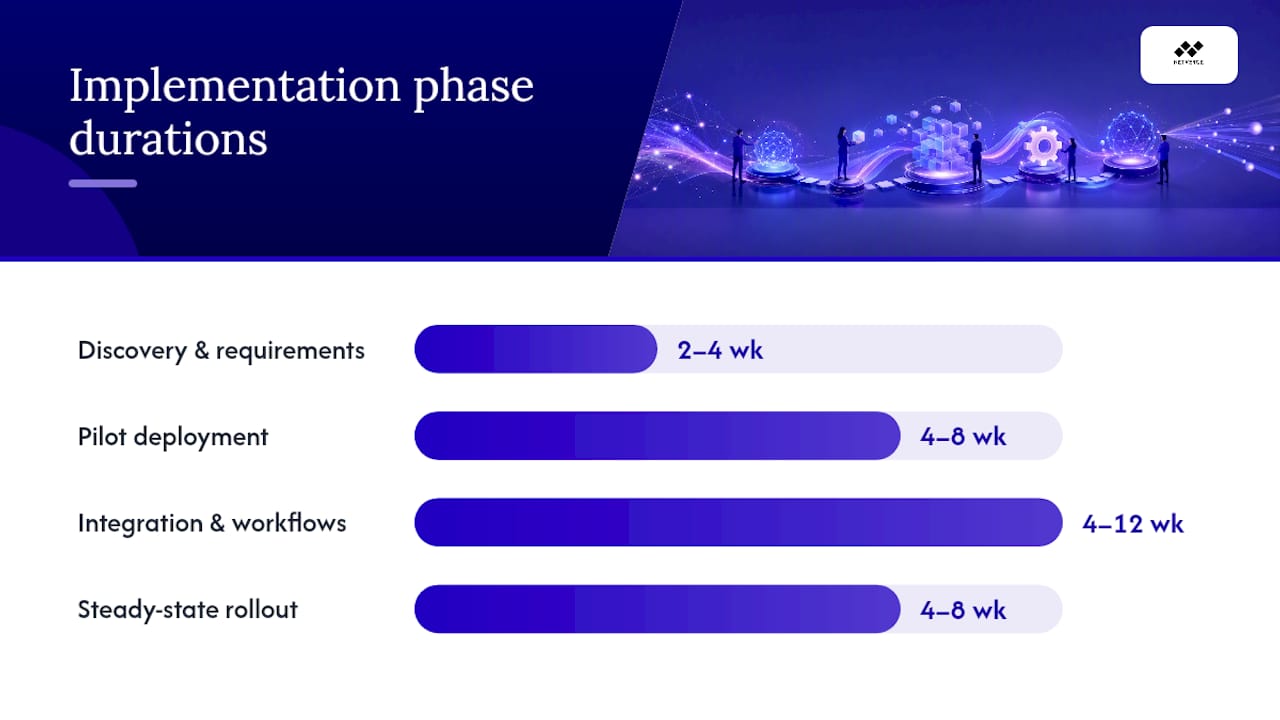
Typical implementation phases run: discovery and requirements (2–4 weeks), pilot deployment (4–8 weeks), integration and workflow configuration (4–12 weeks), and steady-state rollout (4–8 weeks). Enterprise platforms sit at the longer end; mid-market SaaS tools can reach production in 6–10 weeks total.
On TCO: buyer guidance consistently recommends applying a multiplier to year-one license costs to account for implementation services, training, customization, and ongoing admin overhead. The actual first-year cost for enterprise platforms routinely exceeds the license fee by a significant margin. Budget accordingly before you sign.
Pro Tip: Run your proof of concept against a real incident scenario from the past 90 days, not a vendor-supplied demo script. If the platform can't handle your actual data and workflow in a controlled test, it won't handle it in production.
For teams evaluating service desk automation as part of their platform selection, the automation maturity check is the single highest-value test you can run during a PoC.
Why Netverge stands out for distributed networks and MSPs
Most IT management platforms are built around the service desk as the center of gravity. Netverge is built around the network. That architectural difference matters for MSPs and multi-site enterprises whose most frequent and most costly incidents originate at the network layer, not the application layer.
Technical differentiators:
- AI-driven triage analyzes incoming telemetry and routes incidents to the correct resolution path without manual queue review, reducing mean time to resolution
- Autonomous remediation agents execute defined playbooks for common issue classes, closing tickets before a technician is paged
- Vergepoints edge hardware provides physical on-site visibility at branch locations, capturing layer-1 and layer-2 telemetry that software agents running on endpoints cannot see
- Knowledge graph maps relationships between devices, configurations, and historical events, enabling root-cause correlation across distributed sites
- Multi-tenant architecture with role-based access lets MSPs manage separate client environments from a single interface without data bleed between tenants
Validation checks to run during your trial:
- Connect Netverge to a live network segment and verify that the 28+ sensors populate telemetry within the expected ingestion window
- Simulate a common recurring incident (interface flap, DHCP exhaustion, latency spike) and confirm AI triage categorizes and routes it correctly
- Test the API connection to your existing ITSM or PSA tool and verify bidirectional ticket sync
- Review the security and compliance posture against your organization's data handling requirements
- Check data portability: confirm you can export telemetry history and configuration data in a standard format
Outcome metrics to track post-deployment:
- Mean time to resolution (MTTR) before and after AI triage activation
- Ticket deflection rate from autonomous remediation agents
- Reduction in tool count (Netverge consolidates monitoring, documentation, and ticketing)
- Technician hours saved per week on manual alert correlation
Real-world AI in IT management deployments show that the highest ROI comes from autonomous remediation on high-frequency, low-complexity incidents. Define those incident classes during onboarding and configure agents against them first.
Onboarding expectations: Netverge's SaaS deployment means the platform is available immediately after provisioning. Vergepoints hardware ships to site locations and requires physical installation. Plan for a 2–4 week onboarding window to connect sensors, configure multi-tenant access, and tune AI triage thresholds against your environment's baseline telemetry.

Pro Tip: Ask Netverge's team to walk you through a live knowledge graph query against your network topology during the trial. The graph's ability to surface device relationships and historical correlation is the feature that most differentiates it from standard RMM and ITSM tools in a side-by-side evaluation.
The category trap is the real risk — not the vendor choice
Most IT platform evaluations fail before the first demo. The team identifies a pain point, searches for "best IT management software," and starts evaluating vendors in the wrong category entirely. An organization whose primary problem is network-layer visibility across 40 branch sites does not need a better service desk. It needs observability infrastructure. Buying ServiceNow or Freshservice for that problem is like buying a project management tool to fix a network outage.
The ISG Buyers Guide and analyst coverage are useful for understanding the vendor landscape, but they are built around ITSM as the center of gravity. For MSPs and distributed enterprises, the more important question is whether the platform can see the infrastructure before the ticket is raised. That is where most evaluations go wrong: they optimize for ticket workflow and miss the upstream visibility gap entirely.
The second mistake is underestimating TCO. List price is the starting point, not the budget. Implementation services, admin training, customization work, and integration maintenance add up fast, particularly for enterprise platforms with complex CMDB requirements. The teams that get this right apply a realistic cost multiplier to year-one license fees and build that into the business case before the contract is signed.
Netverge's position in this market is specific: it is not a replacement for an ITSM platform in organizations that primarily need process governance. It is the right answer for the operational layer that most ITSM platforms don't reach, which is the network itself. For MSPs managing distributed client infrastructure and enterprises with multi-site visibility gaps, that distinction determines whether the platform investment actually reduces incidents or just manages the tickets they generate.
Netverge: network-layer visibility where ITSM platforms stop
ServiceNow, Jira Service Management, Freshservice, and the rest of the platforms in this roundup are strong answers to the ITSM problem. If your primary need is ticket workflow, change governance, or endpoint patching, several of them will serve you well.
Netverge addresses a different layer. For MSPs managing multiple client networks and enterprises with distributed branch infrastructure, the gap is not ticket management. It is real-time visibility into the network itself, correlated across sites, with AI triage that acts before a ticket is ever raised.

The platform combines AI-powered network monitoring, Vergepoints edge hardware for on-site physical visibility, autonomous remediation agents, and a unified knowledge graph into a single subscription. Multi-tenant architecture means MSPs manage all client environments from one interface. The AI-powered ticketing layer handles triage and routing automatically, reducing the manual queue management that consumes technician time across distributed operations.
For MSP automation specifically, Netverge's per-tenant model scales predictably as you add clients, without the per-device cost explosion that RMM tools impose at scale. Use the pricing calculator to estimate your monthly cost based on your current environment size, or start a free trial to run a live PoC against your network.
Sources
- Best IT Management Software Products for 2025 - G2
- IT Management Software Comparison 2026: 12 Platforms Enterprise Teams Actually Use
- How to Select IT Operations Software
- ISG Buyers Guide for IT Service Management
- 10 Best Asset Management Software Of 2025 - Forbes