Network Settings Explained for MSPs and Multi-Site IT
Published
- what are network preferences
- network settings explained
- how to access network settings
- what is network settings
- understanding network configuration

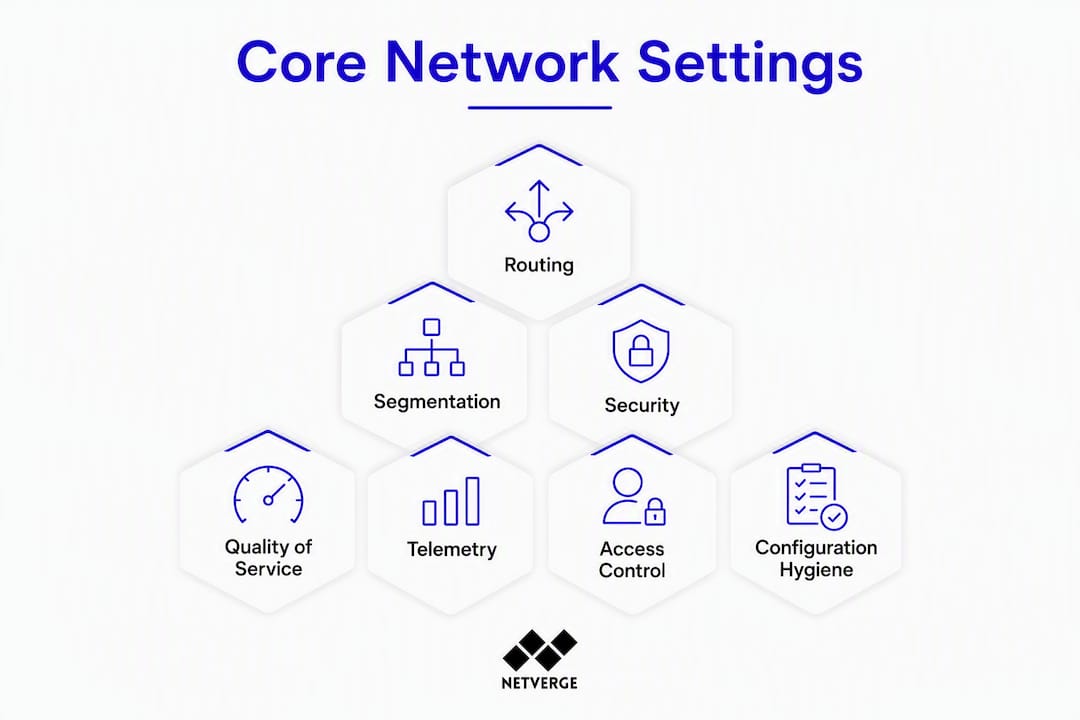
Enterprise network settings are the configuration and policy controls — routing protocols, VLANs, firewall rules, telemetry endpoints, device credentials, and automation pipelines — that determine how every device behaves across your multi-site estate. This is not about Wi-Fi passwords or phone proxy settings. For MSPs and enterprise network operations teams, understanding network configuration means owning every layer of policy that governs traffic, access, and observability at scale.
The core categories you are responsible for managing:
- Routing: BGP session attributes, OSPF area assignments, route filters, and next-hop policies
- Layer 2 segmentation: VLAN tagging, trunk/access port modes, SVI configuration, and IP helper addresses
- Firewall and ACLs: Security zone definitions, rule ordering, and access control lists
- QoS: DSCP markings, class maps, policy maps, and queueing strategies
- Telemetry: SNMP v2/v3, NetFlow, sFlow, syslog, and metrics endpoint thresholds
- Credentials and access: TACACS/RADIUS integration, certificate-based auth, and secrets management
- Automation and change control: Template-driven deployments, versioned backups, and RBAC-enforced change pipelines
Netverge is built to manage all of these categories from a single platform, which is why the sections below map directly to what your NOC team handles every day.
Table of Contents
- What the core components of enterprise network settings actually look like
- Why unmanaged network settings create real operational risk
- Common mistakes MSPs and multi-site operators make with network settings
- Best practices for managing network settings at scale
- What to prioritize when choosing an automation or change-management platform
- How Netverge maps to these operational needs
- Audit and rollout checklist: step-by-step with typical effort estimates
- Key Takeaways
- Why automation-first is the only approach that actually scales
- Netverge gives you a single platform for enterprise network settings management
- Authoritative sources and further reading
What the core components of enterprise network settings actually look like
Each configuration category has a distinct operational home and failure mode. Knowing both is what separates reactive firefighting from proactive management.
Routing lives in your edge and core routers. BGP session attributes — local preference, MED, route maps — control how traffic enters and exits your AS. OSPF area design determines convergence speed. A misconfigured route filter can black-hole traffic for an entire site in seconds.

Layer 2 segmentation is where VLAN tagging and trunk port modes define which traffic flows where. SVI configuration and IP helper addresses tie Layer 2 segments to Layer 3 routing. Misconfigured trunk modes are among the most common causes of silent connectivity failures across multi-site deployments.
Firewall rules and ACLs enforce security zones and policy ordering. Rule ordering matters: a permissive rule placed above a deny rule silently overrides it. Vendor-neutral, template-driven configuration management lets MSPs standardize ACL structures across heterogeneous estates without being locked into a single vendor's policy syntax.
QoS settings — class maps, policy maps, DSCP markings — determine which traffic gets priority under congestion. Voice and video traffic without proper QoS profiles degrades noticeably before any alert fires.
Telemetry endpoints are the observability foundation. SNMP v3 provides authenticated polling; NetFlow and sFlow give per-flow visibility; syslog captures event streams. Threshold configuration on these endpoints determines whether your monitoring platform catches anomalies or generates noise.
Device identity and access settings include TACACS/RADIUS integration for centralized authentication, local fallback accounts, and certificate-based auth for API access. Shared credentials with no rotation policy are a direct compliance liability.
Configuration hygiene ties everything together: parameterizable templates, device family groupings, and baseline configs that define the known-good state for every device class in your inventory.
Why unmanaged network settings create real operational risk
Consistent, auditable network settings reduce outages, security exposures, and audit friction. The inverse is also true: configuration drift and manual change processes are among the leading causes of network-related incidents.
FireMon's change management guidance is direct on this point: manual CLI-driven processes are error-prone and time-consuming, and they scale poorly as estate size grows. A single unreviewed one-off change can introduce a routing loop, open an unintended firewall path, or break a QoS policy across dozens of downstream devices.
Operational impact: Configuration drift across a 50-site estate can mean dozens of devices operating outside their baseline, each a potential incident waiting to surface during peak traffic or a security audit.
From a compliance standpoint, auditors need evidence of who changed what, when, and why. Manual CLI processes rarely produce that evidence in a usable format. MTTR climbs when engineers spend time reconstructing what changed rather than fixing it. Network infrastructure monitoring strategies that tie telemetry baselines to change events cut that reconstruction time significantly.
MSNetViews research confirms that multisite organizations can enforce a global network security policy across distributed sites with low policy-settle latency — but only when the policy model is parameterized and consistently applied, not when each site is managed ad hoc.
Common mistakes MSPs and multi-site operators make with network settings
Most configuration failures trace back to a small set of recurring process gaps:
- Manual CLI scripts without versioning: One-off changes with no approval workflow, no diff, and no rollback path. When something breaks, the change history is in someone's terminal buffer.
- Hard-coded, device-specific configs: Configs that embed IP addresses, credentials, or vendor-specific syntax directly, making them impossible to reuse or audit across a mixed-vendor estate.
- Shared accounts and no credential rotation: A single shared enable password across 200 devices is not a credential policy. It is a compliance gap and an incident waiting to happen.
- No staged validation: Pushing changes directly to production without a dry-run, linting check, or canary deployment. A syntax error in a template can propagate to every device in a device family simultaneously.
- Brittle alert thresholds: Static thresholds that do not account for traffic baselines generate alert fatigue. Teams start ignoring alerts, and real anomalies go undetected.
Pro Tip: Automate the three changes your team makes most frequently first. Proving that automation reduces errors on low-risk, high-frequency tasks builds stakeholder confidence faster than any architecture proposal.
Best practices for managing network settings at scale
The operational baseline for any MSP or multi-site enterprise is template-driven configuration, strict RBAC, versioned backups, and automated validation before any change reaches production.
Policy and template design starts with parameterizable templates organized by device family. Environment variables (site ID, VLAN ranges, BGP AS numbers) replace hard-coded values. A single template update propagates correctly to every device in the family rather than requiring per-device edits.
Access control and secrets require TACACS/RADIUS for centralized authentication and a secrets manager for credential storage and rotation. Least-privilege RBAC means a tier-1 engineer can view configs but cannot push changes without an approval workflow.
The change pipeline should follow a consistent sequence: change request → automated linting and validation → staged rollout (canary or phased) → post-deploy drift check. Pre-deploy validation and ITSM integration are not optional for teams managing hybrid environments at scale.
Documentation and evidence mean maintaining a current inventory, storing config diffs tied to change tickets, and producing exportable audit logs. Runbooks should be searchable and linked to the devices and policies they cover. The network documentation guide for IT teams covers the artifact structure in detail.
Pro Tip: Link your telemetry baselines to your change policy. A post-deploy telemetry check that runs automatically 15 minutes after a change closes the validation loop without requiring manual verification.
What to prioritize when choosing an automation or change-management platform
The capabilities that separate a platform that scales from one that creates new problems:
- Multi-vendor driver support: The platform must manage Cisco, Juniper, Arista, Palo Alto, and others from a single interface without requiring vendor-specific modules for each task.
- API-first design: Every operation available in the UI should be accessible via API for integration with ITSM, CI/CD pipelines, and custom workflows.
- Template extensibility: Customer-extensible templates with variable support, not locked-down vendor templates. Vendor neutrality is the only way to manage heterogeneous estates safely.
- Distributed collectors: Site-local collectors reduce latency, keep changes inside regulatory zones, and preserve tenant isolation for MSP multi-tenant deployments.
- RBAC and tenant separation: Strict role-based access with tenant boundaries prevents cross-customer visibility in MSP environments.
- Configurable rollback and staged rollouts: Rollback must be automated and testable, not a manual CLI procedure performed under pressure.
- Audit trail and ITSM integration: Every change needs a who/when/why record exportable for compliance reviews.
Pro Tip: Test any platform with your actual device mix before committing. Vendor-provided demos use clean, homogeneous lab environments. Your estate has firmware inconsistencies, legacy configs, and edge cases that only surface in real conditions.
How Netverge maps to these operational needs
Netverge unifies monitoring, documentation, automation, and evidence collection to manage enterprise network settings across multi-site estates from a single platform.
The capabilities that map directly to the operational gaps covered above:
- Telemetry integration and alerting: AI-powered observability across SNMP, NetFlow, sFlow, and syslog, with 28+ intelligent sensors and configurable alert thresholds that adapt to traffic baselines rather than static values. Alert design and triage guidance is built into the platform's runbook framework.
- Vergepoints edge hardware: Plug-and-play on-site collectors that provide local telemetry where remote polling is insufficient, feeding directly into the central platform.
The key features of network management that MSPs rely on — multi-tenant visibility, documentation, and automation — are core platform capabilities, not add-ons.
Pro Tip: For a staged config rollout, use Netverge to push the change to a single canary site, run a 15-minute telemetry check against the pre-change baseline, then trigger the phased rollout to remaining sites only if no anomalies surface. The audit trail is generated automatically.
Audit and rollout checklist: step-by-step with typical effort estimates
| Task | Owners | Duration | Risk Level |
|---|---|---|---|
| Discovery and inventory | NOC + platform | 1–3 days | Low |
| Baseline and template creation | Senior engineers | 3 days | Medium |
| Linting and pre-deploy validation | Automation team | 1–2 days | Low |
| Canary deployment (1–2 sites) | NOC + change manager | 1 day | Medium |
| Phased rollout (remaining sites) | NOC | 3–10 days | Medium–High |
| Post-deploy drift detection and audit export | Platform automated | Ongoing | Low |
Immediate next actions for your team:
- Pull current configs from all managed devices and store them in a versioned repository
- Identify device families and create parameterizable baseline templates for each
- Map every privileged account to a named user and rotate shared credentials
- Define rollback criteria before the first production change, not after
- Configure post-deploy telemetry checks tied to your change ticket workflow
- Export a current audit log to validate your compliance evidence baseline
Key Takeaways
Consistency, automation, and auditability are the three operational goals that determine whether your network settings management scales or breaks under pressure.
| Point | Details |
|---|---|
| Template-driven configs reduce drift | Parameterizable templates eliminate hard-coded values and make changes repeatable across device families. |
| Manual CLI processes increase outage risk | FireMon's guidance confirms that unreviewed, one-off CLI changes are a leading source of human-induced incidents. |
| Staged rollouts protect production | Canary deployments with automated post-deploy telemetry checks catch errors before they propagate across all sites. |
| Audit trails are a compliance requirement | Every change needs a who/when/why record tied to a change ticket and exportable for auditors. |
| Netverge unifies the full workflow | Netverge covers inventory, telemetry, RBAC, automated runbooks, and audit evidence in one platform for MSPs and multi-site enterprises. |
Why automation-first is the only approach that actually scales
The conventional argument against automation-first is that manual CLI gives engineers more control. That argument holds for a 10-device lab. It collapses at 500 devices across 30 sites.
The real trade-off is not speed versus control. It is whether your control mechanisms are reproducible. A manual CLI change is controlled by the individual engineer's knowledge and attention at that moment. A template-driven, validated, RBAC-enforced change pipeline is controlled by a process that runs the same way every time, regardless of who is on shift.
Starting small matters. Automate your three most frequent, lowest-risk changes first. Prove the error rate drops. That evidence is what gets stakeholder approval for the broader rollout. MSPs managing distributed networks consistently report that the hardest part is not the technology — it is building internal confidence in the process. The technology is ready. The process discipline is what takes time.
Netverge gives you a single platform for enterprise network settings management
Fragmented tools mean fragmented visibility. If your monitoring platform does not talk to your documentation system, and neither talks to your change pipeline, you are managing network settings with three separate sources of truth — and none of them is complete.

Netverge consolidates that entire workflow. Real-time AI-powered monitoring covers telemetry, anomaly detection, and alert triage. Vergepoints hardware provides on-site visibility where remote polling falls short. Multi-tenant RBAC keeps customer environments isolated. Automated runbooks handle known failure patterns without manual intervention. And every change produces an audit trail your compliance team can actually use.
The role of managed services in business efficiency depends on operational consistency at scale. Netverge is built for exactly that.
For a pilot, pick one customer or region, deploy Vergepoints at two to three sites, and run a 30–60 day trial against your current toolset. Request a demo at netverge.com/monitoring to see the platform against your actual device mix.
Authoritative sources and further reading
- MSNetViews: Geographically Distributed Management of Enterprise Network Security Policy — research on multisite policy enforcement and parameterized global policy models
- Network Configuration and Change Management Best Practices — FireMon guidance on structured change steps and the risks of manual CLI processes
- Network Security Policy Management (NSPM) Software | FireMon Policy Manager — pre-deploy validation, ITSM integration, and audit-ready documentation for hybrid environments
- Service Provider Network Configuration Management | rConfig — vendor-neutral, template-driven management for multi-vendor MSP estates
- What is network documentation? A guide for IT teams — practical artifact structure for inventory, runbooks, and config diffs
- Key features of network management for IT pros — Netverge feature mapping for MSP operations
- Types of network alerts for proactive IT management — alert threshold design and runbook integration guidance