
Network change management is the formal process that ensures every network change is classified, tested, and rolled back safely so services stay available. Four actions matter more than any others when you schedule a change:
- Classify the risk before you touch a device.
- Test with production-aware checks, not just lab validation.
- Schedule the window and communicate it to every affected team.
- Have a rollback plan and rehearse it before you need it.
These four steps align with the process principles outlined by TechTarget and echo the deployment discipline Cisco engineers describe at Cisco Live. A platform like Netverge can help track which changes touched which devices, but the discipline has to come first.
Key Takeaways
Network change management works when risk classification, production-aware testing, and rehearsed rollback plans are enforced together, not treated as optional steps.
| Point | Details |
|---|---|
| Classify before you test | Match testing depth and approval level to a documented risk score, not habit. |
| Rollback plans need rehearsal | A rollback that restores config alone can miss stale ARP and conntrack state. |
| Automate proven changes only | Run first-time procedures manually; automate after validation, per staged rollout patterns. |
| Track three metrics monthly | Change success rate, change-related incidents, and MTTR reveal process gaps early. |
| Netverge adds shared visibility | Its knowledge graph and AI triage speed dependency mapping and post-change verification. |
Table of Contents
- What Does Network Change Management Actually Cover?
- Who Owns Network Changes, and What Policies Govern Them?
- How Does the Change Process Actually Flow From Request to Documentation?
- How Do You Classify Risk and Match It to Process Rigor?
- Why Do Changes That Pass Lab Testing Still Break Production?
- When Should You Automate a Network Change, and When Should You Not?
- Which Metrics Actually Show Whether Your Process Is Working?
- How Do You Stop Documentation From Falling Out of Date?
- How Does Unified Visibility Change the Risk Calculation?
- A 10-Step Runbook for Any Scheduled Network Change
- Why Ownership Beats Any Process Document
- Bring Change Management Into One System With Netverge
- Frequently Asked Questions
- Sources
What Does Network Change Management Actually Cover?
Network change management governs modifications to routers, switches, firewalls, load balancers, and the policies that connect them. It differs from general ITIL change management, which spans applications and servers too, and from network configuration management, which focuses narrowly on tracking device configs and versions. NCM sits above configuration management and borrows structure from ITIL but adds network-specific concerns like routing convergence and traffic path impact, as explained in ITSM Change Management - Solution for Guru.
A firmware upgrade on a core switch or a routing policy change needs the full workflow: request, review, testing, and rollback plan. Adding a single static route for a new client site, or renewing a certificate on a known template, rarely does. Reserve the lightweight, expedited path for low-risk, repetitive changes with a proven history and a fast rollback. Everything else earns the full process.
Who Owns Network Changes, and What Policies Govern Them?
Every functioning program rests on three pillars: written policy, defined roles, and a governance body sized to the organization.
Policy needs to spell out approval thresholds (who can approve what risk level), standard maintenance windows, and a separate emergency-change procedure with its own after-the-fact review requirement. Without that emergency track, teams route urgent fixes around the process entirely, and the process dies from disuse.
Roles break down cleanly:
- Requester — defines the business need and proposed scope.
- Change owner — the engineer accountable for planning, testing, and execution.
- Peer reviewer — checks the technical plan and rollback strategy.
- Approver — signs off based on risk level, often a team lead or manager.
Governance scales with team size. A five-person network team can run a lightweight change board that meets for fifteen minutes twice a week. Larger organizations, or ones with regulatory exposure, need a full Change Advisory Board with representation from security, applications, and the business units affected by outages.
How Does the Change Process Actually Flow From Request to Documentation?
A repeatable process turns individual judgment into a shared standard. Here is the flow that holds up under real production load, built around the five core principles TechTarget identifies for network change management: scope and risk analysis, peer review, pre-deployment testing, implementation, and documentation.
- Request. The requester submits scope, business justification, a named owner, a test plan, and a rollback procedure. Incomplete requests get bounced immediately, not debated in the review meeting.
- Assessment. The owner maps blast radius: which devices, services, and downstream dependencies the change touches. This step catches the failures that hide in the space between systems, like a firewall rule that breaks a load balancer health check.
- Peer review and approval. Reviewers check the technical plan against the risk score. Green-light criteria differ by tier: low-risk changes might need one reviewer's sign-off; high-impact changes need the change owner, a peer, and a manager.
- Implementation. Execute during the approved window, following the documented steps exactly. No improvising once the change starts.
- Verification and documentation. Confirm the change achieved its goal using the pre-agreed checklist, then log the outcome. Any unplanned impact triggers a postmortem, regardless of whether the change was rolled back.
Pro Tip: Require the rollback plan to specify a time limit. If verification isn't complete within that window, the default action is rollback, not "wait and see."
How Do You Classify Risk and Match It to Process Rigor?
Risk classification keeps you from applying a two-hour review cycle to a config change that affects one access port, and from rubber-stamping a core routing change that could take down three sites.
Score each proposed change against a few consistent parameters:
- Endpoints affected — one device versus an entire segment or data center.
- Service criticality — a lab VLAN versus a customer-facing production path.
- Automation level — a scripted, previously validated change versus a manual, first-time procedure.
- External dependencies — whether the change touches a carrier circuit, cloud peering, or a third-party integration.
A change touching one non-critical device with a tested script might score low and go through an expedited approval with a single reviewer. A routing change touching multiple sites with an external carrier dependency scores high and needs full peer review, a wider maintenance window, and deeper testing. Classification should also set your testing depth. Low scores might only need a config diff and a smoke test; high scores demand full convergence testing and staged rollout.
Why Do Changes That Pass Lab Testing Still Break Production?
Lab environments almost never replicate the real thing. Production networks carry DNS caching, live conntrack state, and asymmetric routing paths that a test VLAN simply does not have. That gap is why a change that looked clean in staging takes down a customer-facing service twenty minutes after deployment.
Build your validation around what actually happens on the wire:
- Convergence tests — measure how long routing protocols take to stabilize after the change, not just whether they eventually do.
- State refresh checks — confirm ARP tables, conntrack entries, and DNS caches reflect the new topology, since a rollback of the config alone can leave stale state behind.
- Client-side smoke tests — run checks from an actual end-user vantage point, not just from the device CLI.
Failures often surface in the interaction between systems, not inside one box, per Network World's analysis of maintenance-driven outages. A firewall state table and a load balancer health check can each work fine in isolation and still fail together. Write your rollback plan to restore state, not just configuration, and rehearse it before the real window opens.
When Should You Automate a Network Change, and When Should You Not?
Automation earns its place on repetitive, well-understood changes: standard VLAN provisioning, firmware pushes across a known device fleet, or config templates that have already been validated dozens of times. It has no place on a first-time, high-blast-radius procedure you have never run before.
Cisco's guidance from its 2025 Live session frames this as a maturity curve: manual execution first, then staged automation, often described as crawl, walk, jog, run. Run the change by hand the first time, script it once you trust the steps, then let it run unattended only after it has proven stable.
- Store configuration templates and automation scripts in version control, with change history tied to ticket numbers.
- Push changes through a validation pipeline before they touch production, catching syntax and logic errors early.
- Roll new automation out to a canary group of devices before applying it fleet-wide.
Guardrails matter more as automation scales; a scripting error that once affected one device can now touch hundreds in seconds.
Which Metrics Actually Show Whether Your Process Is Working?
Three numbers tell you almost everything about program health:
- Change success rate — completed changes divided by total attempted, tracked monthly.
- Change-related incident frequency — incidents traceable to a change, as a share of total incidents.
- Mean time to recovery (MTTR) — how long it takes to restore service once a change-related incident starts.
Report these on a monthly cadence, and review them quarterly against process changes you have made. A dropping success rate combined with a stable incident count usually points to a testing gap, not a rollback problem. A rising MTTR despite good success rates often means rollback plans exist on paper but haven't been rehearsed.
| Point | Details |
|---|---|
| Track three core metrics | Monitor change success rate, change-related incidents, and MTTR monthly. |
| Use trends, not snapshots | A single bad month means less than a declining trend over a quarter. |
How Do You Stop Documentation From Falling Out of Date?
Documentation dies from being too heavy to maintain, not from being too light. A minimum viable change log needs only five fields: date, description, reason, author, and a reference to whichever documentation section was updated, a structure Baud Haus Ops recommends for exactly this reason.
Keep that log centralized, alongside a clear reference on why network documentation matters at all for teams still building the habit.
- Store the change log where the change owner already works, not in a separate system nobody opens.
- Update the relevant runbook the same week as the change, before memory of the details fades.
- Run a quarterly reconciliation between the documented topology and the live network to catch drift early.
Lifecycle frameworks like PPDIOO build these reconciliation checkpoints into the operational calendar rather than leaving them to memory.
How Does Unified Visibility Change the Risk Calculation?
Most change failures trace back to a surprise: a dependency nobody mapped, a device nobody documented. Netverge's knowledge graph connects device relationships and documentation in one place, so an engineer assessing blast radius sees the actual dependency chain instead of guessing at it.
- Real-time monitoring surfaces state drift immediately after a change, cutting the gap between deployment and verification.
- AI-powered ticket triage routes change-related incidents to the right owner faster, which shortens MTTR.
- Automated anomaly detection flags the kind of state mismatch, like a conntrack table that didn't refresh, that manual checks often miss.
The goal isn't replacing judgment. It's giving the engineer making the call better information before they make it.
A 10-Step Runbook for Any Scheduled Network Change
Copy this into your ticketing system as a template:
- Validate the request includes scope, owner, test plan, and rollback plan.
- Score risk using endpoints, criticality, automation level, and dependencies.
- Map blast radius and dependent services.
- Route for peer review matched to the risk tier.
- Get formal approval and confirm the maintenance window.
- Notify affected teams and stakeholders at least 24 hours ahead for standard changes.
- Execute the change following the documented steps exactly.
- Run production-aware verification: convergence, state refresh, client-side checks.
- Red flag check: abort and roll back if verification fails or convergence exceeds expected time.
- Log the change and schedule a postmortem if any unplanned impact occurred.
Pro Tip: Set a hard timeline for step 8. If verification isn't clean within your agreed window, roll back by default rather than waiting to see if it self-corrects.
Why Ownership Beats Any Process Document
The biggest failure mode in network change management isn't a missing template. It's the absence of a named owner. Without one, documentation gets abandoned within a few change cycles and drift creeps back in. Naming an owner and enforcing a review cadence, even a short one, does more than any policy rewrite. Test your rollback plans before you need them. A plan you've never rehearsed is a guess wearing a runbook's clothes.

Bring Change Management Into One System With Netverge
Every step in this process depends on having accurate visibility before you approve a change and fast confirmation after you execute it. Netverge unifies that visibility: its knowledge graph maps device dependencies so blast-radius assessments reflect the real network, not a partial inventory scattered across spreadsheets and legacy tools. Automated anomaly detection and AI-driven ticket triage speed up the verification and rollback stages this article covers, cutting the time between "something looks off" and "we know exactly what and where." If you're ready to see how AI-powered monitoring fits your change process, run the numbers on the pricing calculator and start a trial today.
Frequently Asked Questions
What is the difference between network change management and configuration management? Network change management governs the approval, testing, and rollback of any modification. Configuration management tracks the actual device configs and versions over time. Change management decides whether and how a change happens; configuration management records what the network looks like afterward.
How long should a network change window be? It depends on the risk tier. Low-risk changes with tested rollback plans might need a short maintenance window. High-impact changes touching multiple sites or carrier dependencies often require a longer maintenance window to allow for full convergence testing and a rollback buffer.
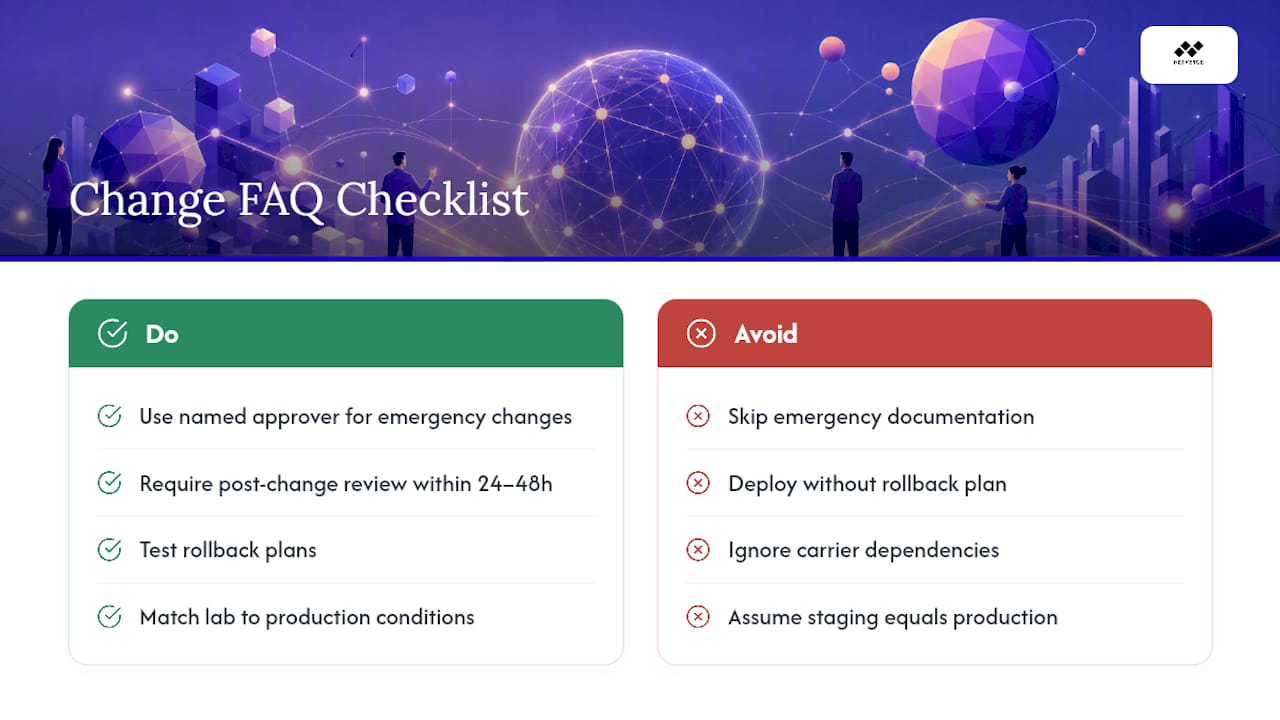
Who should approve emergency network changes? Emergency changes still need a named approver, typically a team lead or manager on call, plus a mandatory after-the-fact review within 24 to 48 hours. Skipping the emergency track's documentation step is how untracked changes accumulate.
What causes most network change failures? Gaps between lab testing and production conditions cause many failures: DNS caching, live connection state, and asymmetric routing that a staging environment doesn't replicate. A missing or unrehearsed rollback plan turns a recoverable mistake into an extended outage.
Sources
For deeper technical grounding beyond this guide, three sources stand out. TechTarget's five principles breakdown lays out the process foundation referenced throughout this article. Network World's analysis of maintenance-driven outages explains why lab testing misses real production failures. Cisco's Live 2025 session on deployment rigor details staged automation patterns worth adopting directly.
- Routine maintenance as a failure vector in modern networks — Network World
- BRKSPG-2695 Cisco Live: Network change process rigor and automation patterns — Cisco Live 2025