Automation documentation is the set of runbooks, playbooks, and config records that make automated remediation repeatable, machine-consumable, and safely reversible. Its core purpose is simple: give both engineers and automation agents a single source of truth for how a workflow triggers, executes, and rolls back without guesswork.
Every runbook needs these fields, no exceptions:
- Trigger condition (exact alert name)
- Scope and expected outcome
- Preconditions and required telemetry
- Inputs/variables with validation rules
- Step-by-step logic with decision branches
- Rollback and circuit-breaker conditions
- Credential links (never plaintext) and dependencies
- Owner, reviewer, version, and last-updated date
Tie each runbook to a measurable target, whether that's MTTR, an internal SLA, or a platform like Netverge that can execute the logic directly. The verdict for this week: standardize three of your highest-frequency runbooks, connect them to monitoring and your PSA, and run one canary test before you write a fourth.
Key Takeaways
Automation documentation only earns its value when every runbook is structured, tested, versioned, and wired into the monitoring and ticketing systems that act on it.
| Point | Details |
|---|---|
| Standardize the mandatory fields | Every runbook needs a trigger, preconditions, decision logic, rollback, and owner metadata, no exceptions. |
| Separate code from runbook text | Store automation code in Git, tag it by commit, and reference that tag from the living runbook in your knowledge base. |
| Test before every deployment | Run unit tests, a staged dry-run, and a canary before letting automation touch production traffic. |
| Assign ownership and a review cadence | Tie change-triggered updates, quarterly audits, and an annual archive pass to a named owner and reviewer. |
| Connect documentation to your platform | Netverge links its knowledge graph, monitoring, ticketing, and autonomous agents so runbook triggers map directly to real alerts. |
Table of Contents
- What Belongs in Automation System Manuals and Runbooks
- Where Should You Store and Version Automation Documentation?
- How Do You Test Automation Before It Touches Production?
- Who Owns the Runbook Library and How Often Should It Be Reviewed?
- A Copy-Ready Runbook Template You Can Adapt Today
- How Should Documentation Connect to Monitoring, PSA, and Automation Tools?
- Handling Exceptions and Errors Inside Automated Workflows
- Keeping Sensitive Data Out of Your Runbooks
- Fitting Documentation Updates Into Your Deployment Pipeline
- Measuring Whether Your Documentation Actually Works
- How Netverge Puts This Documentation Model Into Practice
- Sources
What Belongs in Automation System Manuals and Runbooks
A runbook is only as good as its weakest field. A high-performing NOC runbook follows a seven-component structure that lets engineers determine applicability in under 30 seconds: trigger, diagnostics, decision tree, remediation, validation, escalation, and post-incident notes. Skip one and you've built a document, not a runbook.
Here's the full field-level checklist:
- Trigger condition — the exact alert name, not a paraphrase ("Disk_Usage_Critical_90pct," not "disk getting full")
- Scope and expected outcome — what the automation is allowed to touch and what "success" looks like
- Preconditions and required telemetry — what must be true (agent online, backup window closed) before execution starts
- Inputs/variables — every parameter the automation needs, with a validation rule attached to each one
- Decision tree/branching logic — written so both a technician and an automation engine can parse it
- Remediation steps — command-level detail, not "restart the service"
- Rollback/circuit-breaker actions — the exact undo sequence and the condition that halts execution
- Observability checks — the telemetry values that confirm the fix actually worked
- Ticketing and communication templates — what gets written to the PSA and who gets notified
- Dependencies and cross-client constraints — shared infrastructure, maintenance windows, other automations that touch the same asset
- Metadata — owner, reviewer, version, last-updated
Write for the executor, not the author. That means imperative verbs ("Restart the WinRM service," not "The WinRM service should probably be restarted"), unambiguous timing ("wait 90 seconds," not "wait a bit"), and measurable checkpoints ("ping returns under 50ms," not "check that it's working"). An IT runbook template that skips measurable validation criteria forces a human to make a judgment call an automation engine can't replicate.
Pro Tip: Represent branching logic as pseudo-code first, then wrap it in plain-language guardrails. "IF ping_latency > 200ms AND retry_count < 3, THEN retry" reads clearly to both a script and a Tier 1 technician skimming under pressure.
Example trigger: Alert: BGP_Session_Down (Site: DAL03, Peer: 10.20.1.1). Example branch: "IF interface status = up AND BGP state = idle for over 120 seconds, escalate to routing team. IF interface status = down, attempt interface reset before escalation."
Where Should You Store and Version Automation Documentation?
Pick one source of truth. Splitting runbooks across a wiki, a shared drive, and someone's local notes is how documentation quietly dies. The pattern that holds up at scale: living runbook text in your PSA or knowledge base, with automation code stored immutably in Git and referenced by commit tag.
Storage and access should follow this checklist:
- Keep runbook text where technicians already work: inside the ticket, not a separate portal.
- Store executable automation code in Git, tagged and versioned separately from the descriptive text.
- Enforce role-based access: view-only for most operators, execute permissions reserved for verified roles and automation agents.
- Never store credentials in plaintext inside a runbook. Link to a vault entry instead.
- Tag every runbook by client, site, service type, automation risk level, and escalation path so routing stays reliable.
To decide where something belongs, work through this order:
- Is it prose explaining why and when? It goes in the knowledge base, linked to the ticket type.
- Is it executable code that does the remediation? It goes in Git, referenced by a tagged commit.
- Does the KB entry need to point to a specific automation version? Link the commit tag directly in the runbook, not the branch name.
Automated discovery and continuous inventory keep the underlying topology data accurate, which is what makes the runbook layer trustworthy instead of stale.
How Do You Test Automation Before It Touches Production?
Untested automation is a liability with a friendly interface. The testing matrix that catches problems before a client notices them runs across four stages.
| Stage | What it validates | Who/what runs it |
|---|---|---|
| Unit test | Script logic in isolation, no live infrastructure | CI pipeline |
| Staged dry-run | Full workflow against a non-production clone | Automation engineer |
| Canary run | Real workflow on one low-risk client or site | Automation platform |
| Production observability | Rollback triggers and telemetry checks post-deploy | Monitoring + automation agent |
Safety checklist for anything moving toward production:
- Set explicit timeouts on every automated step, not just the overall job.
- Build circuit-breaker patterns that halt execution after a defined failure threshold.
- Scope credentials to the minimum needed for that specific runbook.
- Define escalation triggers that fire automatically, not ones that depend on someone noticing.
- Require a verified rollback step, tested as often as the forward path.
Track automation success rate, rollback frequency, MTTR, false positives prevented, and the count of incidents resolved without human escalation. These numbers tell you whether your documentation is actually working or just looks tidy.
Statistic Callout: A consistent runbook format has been shown to help engineers identify the correct procedure in under 30 seconds, with reported cases of sharply reduced inconsistency in incident handling once teams adopted the structure.
Embed the unit and dry-run stages directly into your CI/CD pipeline so a code change can't reach canary status without passing both automatically.
Who Owns the Runbook Library and How Often Should It Be Reviewed?
Documentation that nobody owns decays fast. Assign a creator, a reviewer, and an approver for every runbook, and tie updates to your change management process so a change without a corresponding doc update is treated as incomplete work.
The review cycle needs three layers:
- Change-triggered updates — any change to the underlying system or script forces an immediate runbook review.
- Monthly or quarterly audits — spot-check coverage against your top recurring alerts.
- Annual archive pass — retire or rebuild runbooks that haven't fired in a year.
MSP documentation works best as a living, centralized system tied into the PSA, starting with your highest-frequency, highest-risk processes: onboarding, patching, backup verification, incident response.
Give runbooks a maturity label: draft, tested, production, or archived. A runbook only moves to production after it clears a canary run and a documented rollback test. Enforcement matters more than intent:
- Add a documentation checklist to ticket closure so tickets can't close without an update.
- Gate deployment pipelines on documentation sign-off, not just code review.
- Track runbook age, coverage of top alerts, and update velocity as your documentation health metrics.
A Copy-Ready Runbook Template You Can Adapt Today
Here's a compact template. Paste it, fill the brackets, ship it.
Runbook: [Name]
Trigger: [Exact alert name]
Scope: [What this automation touches]
Preconditions: [Required telemetry/state before running]
Inputs: [Variables + validation rules]
Steps:
  1. [Action]
  2. IF [condition] THEN [action] ELSE [action]
Rollback: [Exact undo sequence]
Validation: [Expected telemetry value confirming success]
Ticket template: [PSA field mapping]
Automation code: [Git commit tag]
Owner/Reviewer/Version: [Names + version + date]
Concrete example, backup failure:
- Trigger:
Backup_Job_Failed (Client: Acme, Job: Nightly_SQL) - Precondition: Backup agent online, no active maintenance window
- Branch: IF error code = disk_full, clear temp cache and retry. IF error code = auth_failed, escalate to credentials team immediately.
- Validation: Backup completion log shows success timestamp within retry window
- Ticket template: Auto-populate PSA with client, job name, error code, retry count
Link the Git commit tag directly in the ticket so a technician can trace exactly which automation version ran.
Pro Tip: Keep the example short enough that an L1 technician can read it in the time it takes the alert to page them. If a runbook needs scrolling past one screen to find the rollback step, it's too long.
How Should Documentation Connect to Monitoring, PSA, and Automation Tools?
Documentation only earns its keep when it's wired into the systems that act on it. Runbook automation works by mapping monitoring alerts directly to runbook triggers, so the alert name in your monitoring platform matches the trigger field in your documentation exactly, no translation required.
Practical integration patterns:
- Map runbook metadata (owner, risk level, escalation path) directly to PSA ticket fields on creation.
- Use webhooks or APIs to pull the current runbook version into the ticket automatically.
- Reference Git commit tags from within the ticket so automation engines execute the exact version that was tested.
- Expose the telemetry values your validation checkpoints need, so success or failure is observable, not assumed.
This is where a platform like Netverge's network monitoring stack, knowledge graph, and autonomous agents earn their place: alerts route straight into the correct runbook, ticket fields populate automatically, and agents reference the tagged commit before acting. A useful first step for any team: connect three high-frequency runbooks to monitoring and your PSA, then run one canary deployment before scaling further.
Handling Exceptions and Errors Inside Automated Workflows
Every automation eventually hits a case the happy path didn't anticipate. Document exceptions as explicitly as you document success: name the failure mode, define the fallback action, and specify who or what gets notified.

Structure exception handling as its own decision branch, not an afterthought bolted onto the main flow. If a script expects a device to respond within five seconds and it doesn't, the runbook needs an explicit "no response" branch, not a silent timeout that leaves the ticket open indefinitely. Categorize exceptions by severity: recoverable (retry with backoff), escalatable (route to a human immediately), and catastrophic (trigger the circuit breaker and halt).
Log every exception with enough context to improve the runbook later: what triggered it, what the automation attempted, and what the final resolution was. That log becomes the raw material for your next review cycle. If the same "unexpected" error shows up three times, it's not an exception anymore. It's a branch you missed.
Write error messages for the next reader, not the current one. "Timeout waiting for SNMP response after 3 retries, escalating to Tier 2" tells a technician exactly where things stand. "Automation failed" tells them nothing. The same discipline applies to automated agents: a clear, structured error state lets an autonomous system decide whether to retry, escalate, or halt without a human interpreting a vague log line first.
Keeping Sensitive Data Out of Your Runbooks
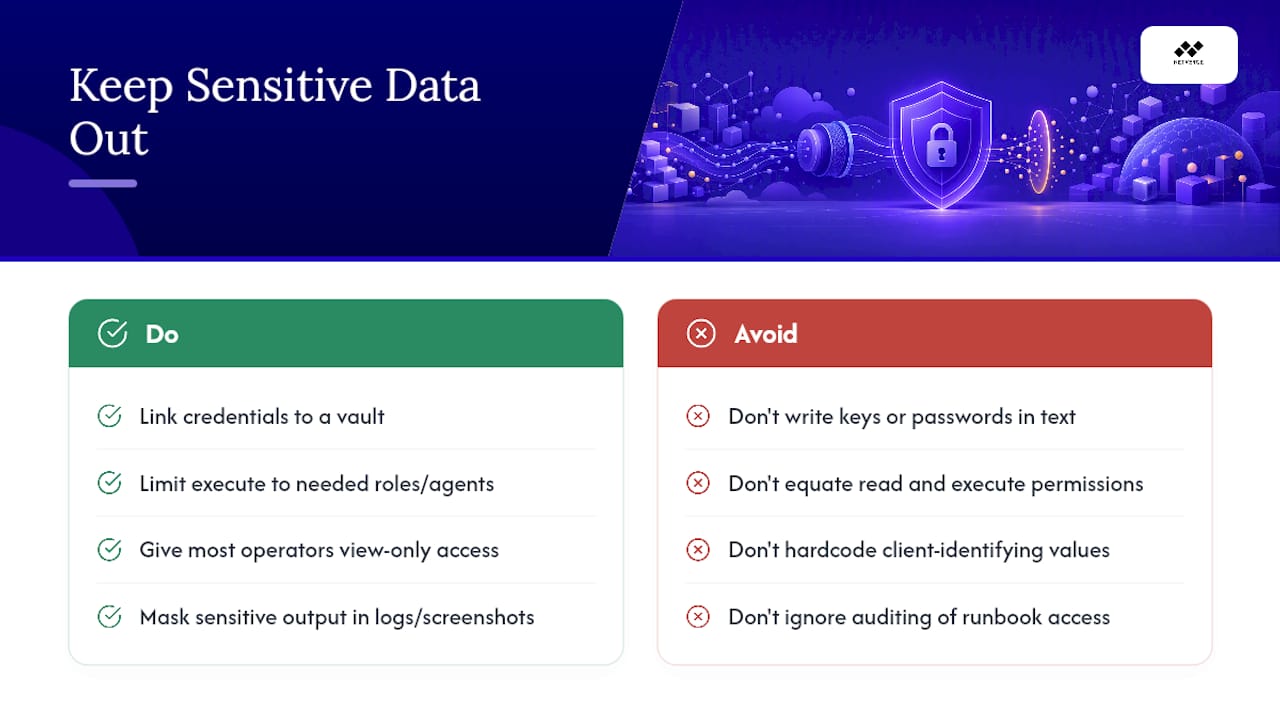
A runbook that leaks a password is worse than no runbook at all. Never write credentials, API keys, or connection strings directly into runbook text. Link to a vault entry instead, and grant execute permissions only to the roles and automation agents that genuinely need them.
Apply role-based access consistently: most operators should have view-only access to runbook text, while execute permissions stay limited to verified technicians and authenticated automation agents. Separate those two permission sets clearly in your PSA or knowledge base, because a documentation platform that treats "can read" and "can run" as the same permission is a security gap waiting to be found.
Mask sensitive output in logs and screenshots referenced by runbooks, including IP address ranges, client names in shared templates, and any customer-identifying data that doesn't need to be visible for the remediation to work. When a runbook is shared across multiple client environments, template the client-specific values as variables rather than hardcoding them, so the same document can't accidentally expose one client's details to a technician working another client's ticket.
Audit access logs on your runbook library the same way you'd audit access to production systems. If a runbook can trigger a remediation action, treat access to it with the same scrutiny as access to the infrastructure it touches.
Fitting Documentation Updates Into Your Deployment Pipeline
Documentation that lags behind the code it describes is actively dangerous, because it tells technicians and automation agents to trust a process that no longer matches reality. The fix is to treat a documentation update as a required artifact of the deployment, not a follow-up task.
Gate your pipeline so a code change can't reach production without a corresponding runbook update attached to the same pull request. That means the reviewer approving the automation script is also confirming the runbook text, the trigger name, and the rollback steps still match what's being deployed. Embedding documentation checks into ticket workflows and preventing ticket closure without an update is one of the more reliable enforcement patterns available, and the same logic applies one level earlier, at the pipeline stage.
Version the runbook text alongside the code using the same commit tag, so anyone looking at the automation history can see exactly which documentation version shipped with which code version. When a rollback happens, roll the documentation back with it. A service desk automation workflow that reverts code but leaves outdated runbook text in place just sets up the next technician to follow bad instructions.
Measuring Whether Your Documentation Actually Works
Good intentions don't reduce MTTR. Numbers do. Track automation success rate, rollback frequency, and false positives avoided as your primary signals, alongside how many incidents got resolved without a human escalation at all.
Build a feedback loop that closes after every incident: did the runbook that fired match what actually happened, or did the technician have to improvise? If improvisation happened, that's a documentation gap, not a one-off. Log it and fix the runbook within the same review cycle rather than letting it wait for the quarterly audit.
Watch runbook age and update velocity as leading indicators. A runbook untouched for over a year against a system that's changed twice in that time is a liability disguised as an asset. Coverage matters too: what percentage of your top 20 recurring alerts actually have a tested, production-grade runbook attached?
Reducing IT response times through automation depends heavily on this feedback discipline. The automation itself is only half the equation. Documentation that improves every time it's used is the other half, and it's the half most teams skip.
Why a Runbook Library Is the Real Scaling Lever
A well-maintained runbook library lets a junior engineer produce the same outcome as your best senior tech, which is the actual point of documenting anything. The returns compound: faster ramp time, fewer escalations, less institutional knowledge walking out the door at every turnover.
How Netverge Puts This Documentation Model Into Practice
Netverge implements the pattern this guide describes directly inside one platform. Its knowledge graph holds the living runbook text, its monitoring stack fires the exact trigger names your documentation references, its ticketing engine maps runbook metadata straight into ticket fields, and its autonomous agents execute or assist with remediation using the tagged automation logic behind each entry.

A practical first move for any team adopting this approach is to pick your three highest-frequency alerts, connect each one to a documented runbook inside Netverge, and run a single canary test on a low-risk site before rolling the connection out everywhere. That's a smaller lift than rebuilding your entire documentation library at once, and it tells you immediately whether your trigger names, decision branches, and rollback steps actually hold up against real telemetry.
See how the pieces fit together on the Netverge monitoring platform, and start connecting your first runbook this week.
Sources
- The Anatomy of a High-Performing NOC Runbook (With Real MSP Use Cases) - Thecodemaze
- MSP Documentation: Why It Matters, What to Document, and How to Make It Stick - Rewired MSP
- Network Documentation Best Practices: A Comprehensive Guide