
Fixing a broken network ticketing workflow follows the same order every time: stabilize intake and triage, document what you have, then automate. Skip that sequence and automation just multiplies whatever mess already exists in your queue. Here is the compact version to act on today.
- Intake: capture the right fields on first submission, not through follow-up emails.
- Triage: assign category, priority, and routing target within minutes, not hours.
- Categorize and prioritize: use objective impact data, not requester guesswork.
- Route and escalate: send tickets to the right team automatically, with a clear fallback.
- Resolve: apply a documented fix and confirm it works.
- Close and link to knowledge: tie every resolution back to a reusable article.
Set two starting targets: time-to-triage under 10 minutes for standard tickets, and a baseline mean time to resolution (MTTR) you can measure improvement against. Fix triage and your knowledge base before you touch automation. Everything below builds on that priority.
Key Takeaways
Fixing triage and knowledge documentation before adding automation is what separates a network ticketing workflow that scales from one that just moves the same chaos faster.
| Point | Details |
|---|---|
| Sequence matters most | Stabilize intake and triage, document the process, then pilot automation, never the reverse order. |
| Set a time-to-triage target | Aim for under 10 minutes on standard tickets and audit accuracy with monthly ticket sampling. |
| Derive priority, don't self-assign it | Base priority on users affected, revenue impact, and security exposure, not requester judgment. |
| Automate the safe wins first | Start with auto-logging from monitoring, password resets, and SLA alerts before touching complex cases. |
| Netverge operationalizes the checklist | Netverge auto-creates tickets from monitoring alerts and applies AI-assisted triage with human review guardrails built in. |
Table of Contents
- Network Ticketing Workflow Checklist: The Full Version
- What Belongs in Intake Forms and Triage Rules?
- Building a Priority Matrix That Doesn't Play Favorites
- Which Ticketing Tasks Should You Automate First?
- What Metrics Actually Prove Your Workflow Is Working?
- How Do You Pilot a New Ticketing Workflow Safely?
- Who Owns Your Workflow After It Ships?
- How an Integrated Platform Operationalizes This Checklist
- An Editorial Note on Small Changes That Actually Stick
- Let Netverge Run the Checklist for You
- Frequently Asked Questions
- Sources
Network Ticketing Workflow Checklist: The Full Version
A checklist only works if every step has an owner, a target, and a way to verify it happened. Here is the expanded version, with acceptance criteria you can hand to a team lead today.
- Intake. Owner: requester or monitoring system. Required fields vary by type: a network incident needs affected site, device or circuit ID, and start time; an access request needs system name, requested permission level, and approver; a change request needs scope, rollback plan, and requested window. SLA target: ticket created within 2 minutes of alert trigger for monitoring-sourced tickets. Test case: submit a mock outage ticket and confirm all required fields populate without manual entry.
- Triage. Owner: first-line technician or AI triage agent. Assign category, priority, routing target, and a context checklist (asset ID, recent logs, screenshot if applicable). SLA target: under 10 minutes for standard tickets, under 3 minutes for flagged outages. Test case: submit a VIP-affecting ticket and time how long it sits before a human or system assigns priority.
- Categorize and prioritize. Owner: triage technician, validated by team lead spot-checks. Apply a fixed taxonomy and a priority formula based on users affected and business impact. Test case: run five archived tickets through the matrix and check for consistent scoring.
- Route and escalate. Owner: workflow engine or dispatcher. Match category and configuration item to the correct team, with a fallback queue for anything unmatched. Test case: submit a ticket with no clean category match and confirm it lands in the fallback queue instead of disappearing.
- Resolve. Owner: assigned technician. Document the fix in the ticket body, not just the internal notes.
- Close and link to knowledge. Owner: resolving technician, reviewed by team lead. Closure requires a documented root cause and, for anything without an existing fix article, a new knowledge base entry. Create a problem or known-error record whenever the same root cause produces three or more tickets in 30 days.
Pro Tip: Build your closure form to require a one-sentence root cause before it lets the technician submit. That single field is what makes your knowledge base searchable six months later.
What Belongs in Intake Forms and Triage Rules?
A ticket is only useful the moment it lands if the form forces the right information out of the requester. Vague intake fields like "describe your issue" produce vague tickets, and vague tickets sit in queues while a technician chases down basics that should have been captured up front. The fix is a short, mandatory field set tied directly to your routing logic, not an open text box.
Four fields make a ticket triage ready the moment it's created, according to a practical triage guide for MSP service desks:
- Category — the type of issue (connectivity, hardware, access, change).
- Priority — a score derived from impact multiplied by urgency, not requester preference.
- Routing target — the team or queue the ticket belongs to, based on category and affected system.
- Context checklist — asset ID, recent error logs, and a screenshot or packet capture where relevant.
Aim for a time-to-triage under 10 minutes on standard tickets, tighter for anything flagged as an outage. Run a weekly sample of 20 to 30 closed tickets and check whether the assigned category and priority match what the resolution actually required. That sampling audit for triage accuracy is worth the twenty minutes it takes, and mature service desks that run it consistently target 90% or higher accuracy on triage calls. Miss that mark and your routing rules, SLA clocks, and reporting all inherit the error downstream.
Building a Priority Matrix That Doesn't Play Favorites

Two-level taxonomies work best for most network ticketing operations: a broad category (connectivity, hardware, access, security) and a subcategory underneath it (VPN, switch, firewall rule, credential reset). Somewhere between 30 and 80 total categories is the sweet spot for most mid-sized IT teams. Fewer than that and your reporting can't distinguish a bad ISP link from a failing switch. More than that and technicians stop using the taxonomy consistently, which quietly defeats the entire point of having one.
Priority should come from facts a requester cannot inflate, not from a dropdown they fill in themselves. A workable matrix looks at three inputs:
- Users affected — a single desk versus an entire site or region.
- Revenue or operational impact — is this blocking a paying customer, a billing system, or a point of sale?
- Security exposure — is data or access control involved?
Letting requesters self-assign "urgent" on every ticket is how priority inflation happens, and it's why priority needs to be derived rather than declared. Routing, meanwhile, should be deterministic wherever possible: skill-based assignment for specialized issues, configuration-item-based assignment when the affected asset is known, and a clearly defined fallback queue for anything that doesn't match a rule. Always link duplicate tickets to the original rather than letting five people from the same office file five separate reports about the same outage.
Which Ticketing Tasks Should You Automate First?
Automation earns its keep only after the underlying process is stable and documented. Skip that step and you end up automating chaos, which is a well-documented failure pattern: analysis on agentic AI project cancellations points to broken workflows as a leading cause when automation initiatives get scrapped. The sequence matters more than the tooling: stabilize the process, document it, then pilot automation on top of it.
- Auto-log tickets from monitoring alerts. Removes the manual creation step for the highest-volume ticket source most networks have.
- Automate password resets and access requests that meet pre-approved criteria. Low risk, high volume, and easy to audit.
- Trigger SLA alerts automatically as thresholds approach. Removes the need for a human to watch the clock.
- Auto-route common, well-defined requests using category and configuration-item matching, starting with the highest-volume, lowest-complexity ticket types first.
Escalation still needs a human-first backbone. Build an escalation chain with defined timers: unacknowledged after 15 minutes, escalate to a senior technician; unresolved after 60 minutes on a priority-one incident, notify the network operations manager. A staff notification and escalation guide for IT teams offers a solid framework for structuring those alert chains so nothing sits silent in a queue.
Pro Tip: Automation should defer to a human the moment confidence in the triage call drops below your threshold. A misrouted VIP outage costs far more than the ten seconds saved by skipping human review.
What Metrics Actually Prove Your Workflow Is Working?
A handful of KPIs tell you whether your ticketing workflow is functioning or just moving tickets around. Track time-to-triage, first response time, MTTR, first contact resolution (FCR), re-triage rate (how often tickets get reclassified after initial routing), and auto-resolution rate for anything automation handles end to end.
SLA windows should never be one-size-fits-all. A seven-step configuration approach for ITIL-aligned service desks recommends setting separate response, resolution, and fulfillment targets by ticket type, then wiring alerts directly into the workflow rather than treating SLA data as a report you check after the fact. A network outage might carry a 15 minute response SLA; a routine access request might carry same-day resolution instead.
- Time-to-triage: under 10 minutes for standard tickets.
- MTTR: measured per category, not as one blended average across your whole queue.
- FCR: percentage resolved without reassignment or reopening.
- Re-triage rate: flags where your intake form or category definitions are failing technicians.
Run a small-sample audit monthly, even 15 to 20 tickets, comparing assigned category and priority against what the resolution actually needed. That single habit catches drift before it shows up in your quarterly numbers.
How Do You Pilot a New Ticketing Workflow Safely?
Never roll a new workflow out to the entire team at once. Test it against scenarios that mirror your real ticket mix, then expand in phases.
- Build scenario-based test tickets. Include a routine password reset, a VIP-affecting outage, and a duplicate ticket filed against an already-open incident, then confirm routing, SLA timers, and duplicate linking all behave correctly.
- Define pilot scope and success criteria up front. Pick one team or region, run it for two to four weeks, and set quantitative targets: triage time under 10 minutes, FCR above your current baseline, zero misrouted priority-one tickets.
- Collect technician feedback alongside the numbers. The people using the workflow daily will spot friction the metrics won't show yet.
- Compare pre- and post-rollout KPIs directly, following the testing and pilot approach outlined for ITSM automation rollouts, before expanding beyond the pilot group.
- Roll out in phases, monitoring each wave against the same KPIs, and refine the workflow based on what the pilot actually surfaced rather than what you assumed going in.
Who Owns Your Workflow After It Ships?
A workflow without a named owner drifts within months as staff turn over and network environments change. Document three things at minimum: the process map showing each step and handoff, the field and category definitions technicians rely on daily, and the routing and escalation rules themselves. Store them somewhere every technician can reach, not buried in a slide deck from the rollout meeting.
Treat any workflow change like the change it is:
- Propose the change and state the reason.
- Test it against the same scenario tickets used in the original pilot.
- Get sign-off from the workflow owner before deploying.
- Monitor KPIs for at least one full cycle after deployment.
- Version the documentation so anyone can see what changed and when.
Review the whole workflow quarterly, and tie configuration item updates in your CMDB or CMDB-lite directly into that review so routing rules never reference assets that no longer exist.
How an Integrated Platform Operationalizes This Checklist
Running this checklist manually across spreadsheets, a monitoring tool, and a separate ticketing system multiplies the exact busywork the checklist is meant to eliminate. An integrated platform closes those gaps by wiring each step directly into the network data that triggered it.
- Auto-ticketing from monitoring alerts removes the manual creation step covered in the intake section, generating tickets the moment a sensor or network monitoring system flags an anomaly.
- AI-assisted triage applies the category, priority, and routing fields automatically, drawing on asset and configuration data tied to ticket triage rather than requiring a technician to look it up.
- CMDB-backed routing matches tickets to the correct team based on the actual configuration item affected, not a static rule that goes stale.
- Knowledge-connected closures link resolutions back to existing articles automatically, keeping the problem/known-error step from the checklist's closure criteria intact.
Guardrails still matter here: AI triage should carry a confidence threshold, below which the ticket routes to a human for review rather than auto-assigning, matching the human-in-loop rule from the automation section above.
An Editorial Note on Small Changes That Actually Stick
The teams that fix their ticketing workflow fastest are rarely the ones chasing the fanciest automation. They're the ones who fix one broken field on an intake form, measure the change for two weeks, and move to the next fix. Big rewrites stall in committee. Small, measured changes ship on a Tuesday and prove themselves by Friday.
The human factor beats the technology factor almost every time. A technician who trusts the triage data will act on it; one who doesn't will re-triage everything by hand anyway, and your KPIs will quietly lie to you.
Let Netverge Run the Checklist for You
Netverge is built to run this exact checklist without the manual stitching between separate monitoring, documentation, and ticketing tools. Instead of a technician copying alert data into a ticket form by hand, Netverge auto-creates tickets straight from live network telemetry, applies AI-assisted triage against your configuration data, and routes tickets using Vergepoints hardware for on-site visibility your monitoring stack might otherwise miss.

That means the intake, triage, and routing steps covered above happen automatically instead of depending on a technician's typing speed at 2 a.m. If your team is ready to see the AI-powered ticketing platform in action against your own network, start a free trial and run your first pilot scenario this week.
Frequently Asked Questions
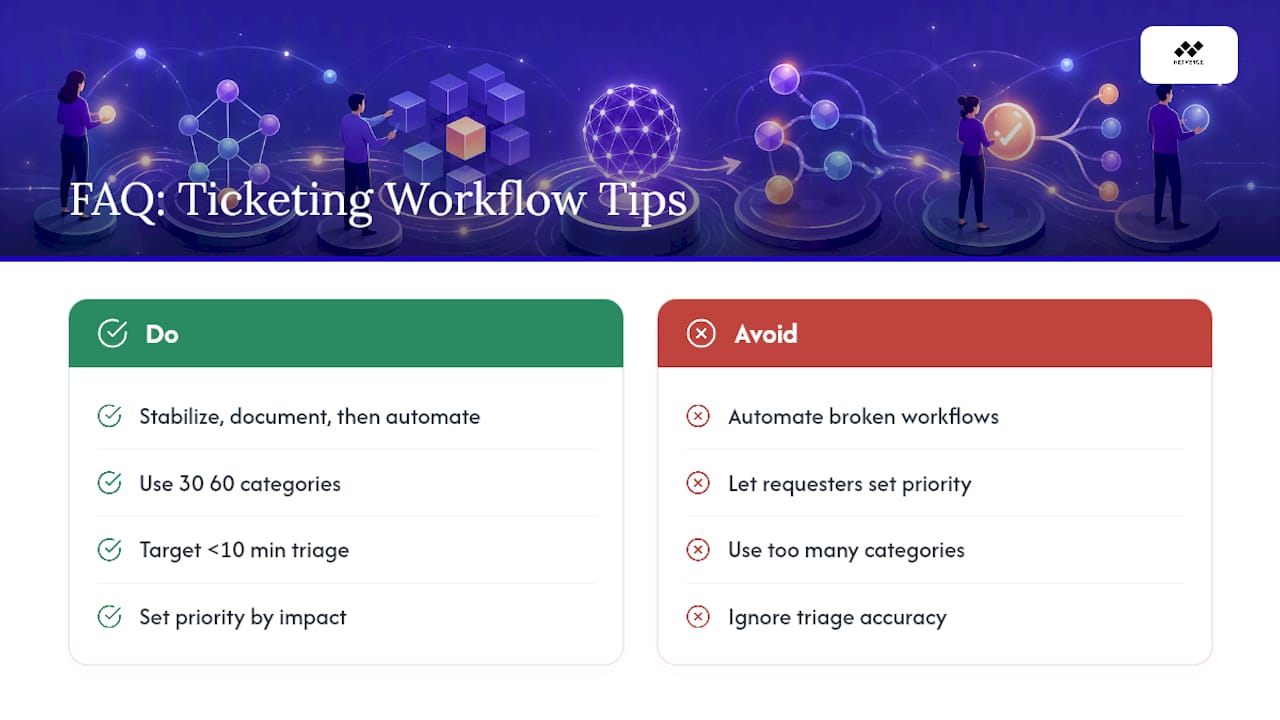
What is a network ticketing workflow checklist? It's an ordered set of steps, intake, triage, categorization, routing, resolution, and closure, each with defined fields, owners, and targets, that turns raw support requests into consistently handled, measurable tickets.
What's the biggest mistake teams make with ticketing workflows? Automating before the underlying process is stable. Automating a broken workflow just executes the same mistakes faster, which is why sequencing, stabilize, document, then automate, matters more than tool selection.
How many ticket categories should a network team use? Somewhere between 30 and 80 total categories works for most mid-sized teams: enough to separate meaningful issue types like VPN failures from switch faults, without so many that technicians stop applying them consistently.
What's a reasonable time-to-triage target? Under 10 minutes for standard tickets, tighter for flagged outages. Track it alongside a monthly accuracy sample so the speed doesn't come at the cost of correct routing.
Should priority be set by the person filing the ticket? No. Priority should come from objective facts, users affected, revenue impact, security exposure, rather than requester preference, which tends to inflate every ticket to "urgent" if left unchecked.
Sources
For deeper detail on the sources behind this checklist, see monday.com's ITSM best practices guide, ITU Online's service desk configuration steps, and SMC Consulting's ITSM automation workflow list.
- ITSM automation: 15 workflows to reduce L1 tickets | SMC Consulting
- Why 40% Of Agentic AI Projects May Be Canceled By 2027 | Forbes