
What is ticket triage, and why does it define your service desk?
Ticket triage is the structured intake process every service desk uses to log, categorize, prioritize, and route incoming support requests before resolution begins. Its purpose is direct: get each issue to the right team, with the right priority, and the right context attached, before a single troubleshooting step is taken. Without it, teams sort tickets by gut feeling, miss SLA deadlines, and route work to the wrong people.
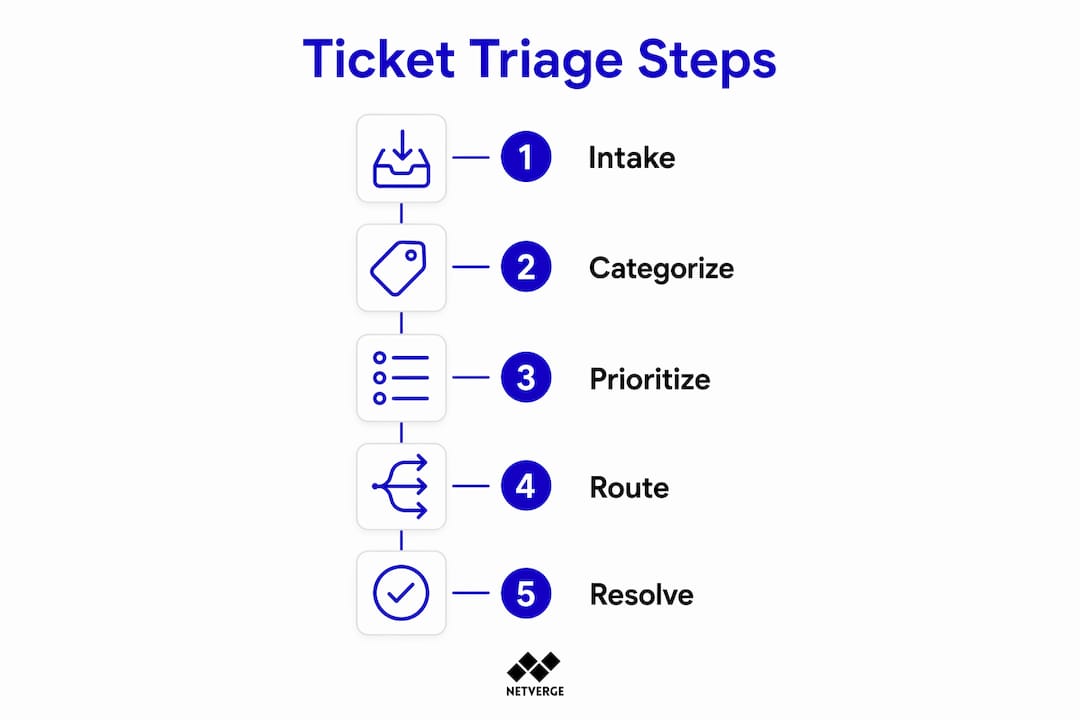
In ITIL terms, ticket triage sits at the core of Incident Management. The process applies equally to IT service desks handling network outages and customer support teams managing billing disputes. What changes is the taxonomy. What stays constant is the underlying logic: log, categorize, prioritize, route, monitor, and close.
The key metrics tracked throughout the triage lifecycle tell you whether the process is working:
- First response time: how quickly an agent acknowledges the ticket
- Resolution time: total time from submission to closure
- SLA compliance rate: percentage of tickets resolved within contracted timeframes
- Reassignment rate: how often tickets bounce between teams before finding the right owner
- Backlog growth: net change in open ticket volume over a defined period
A rising reassignment rate or a growing backlog are early signals that your triage process has a structural problem, not a staffing one.
Why structured ticket triage matters for IT and support teams
Unstructured ticket handling creates a predictable set of failures: SLA breaches, agent burnout, and high-impact incidents buried under routine requests. A structured triage process prevents all three.

The most direct benefit is SLA protection. SLA timers define response and resolution targets, and when those targets are breached, escalation triggers automatically. A triage process that assigns correct priority at intake means the clock starts with the right urgency level attached, not corrected after the fact.
Agent workload is the second major factor. AI-driven triage filters duplicate and routine tickets before they consume agent time, letting teams focus on high-value problems. When every password reset and printer jam lands in the same queue as a production outage, agents spend cognitive energy sorting rather than solving.
The operational benefits of a well-run triage process include:
- Misrouting prevention: tickets reach the team with the right skills on the first assignment
- Priority accuracy: high-impact incidents get worked before low-urgency requests, regardless of submission order
- Workload visibility: queue data shows where demand concentrates, supporting staffing decisions
- Burnout reduction: agents handle work matched to their skill set, not whatever arrived most recently
For IT service teams managing distributed networks, the stakes are higher still. A miscategorized network outage ticket treated as a routine service request can cascade into a multi-site failure. Triage is the control point that prevents that outcome.
How to triage tickets: a step-by-step process
Effective ticket triage follows a repeatable sequence. Each step builds on the last, and skipping any one of them creates downstream problems.
Log the ticket. Every support request enters a single service management platform. Phone calls, emails, chat messages, and portal submissions all create a ticket record. Consistent logging prevents requests from living in inboxes or chat threads where they disappear.
Capture structured data at submission. Structured user inputs collected during submission, such as category, business impact, affected asset, and location, form the basis for every downstream decision. When users provide this context upfront, automation can act on it immediately.
Categorize by taxonomy. Each ticket maps to a category in the service catalog. Categories drive custom field requirements, team routing, and reporting. A well-designed taxonomy makes classification consistent across agents and shifts.
Prioritize using an impact-urgency matrix. Priority is a derived value calculated from two inputs: how broadly the issue affects the business (impact) and how time-sensitive resolution is (urgency). An objective priority matrix eliminates the "who screams loudest" problem and ensures a single affected executive does not automatically outrank a site-wide outage.
Route and assign. Assignment follows category and priority. Routing rules send tickets to the correct help desk, team, or individual technician based on skill set and availability. Manual assignment is a fallback, not the default.
Enrich the ticket with context. Adding asset IDs, user history, and screenshots during triage reduces the time technicians spend gathering background information before they can start working. This enrichment step is where the largest productivity gains accumulate.
Monitor SLAs and manage tasks. Once assigned, SLA timers run against the ticket's priority level. Task checklists attached during triage give technicians a clear resolution path without requiring them to interpret the ticket from scratch.
Escalate when thresholds are breached. Escalation is distinct from routing. Routing happens at intake; escalation triggers after assignment when an SLA deadline approaches or a ticket requires higher-level intervention. Both are necessary, and they solve different problems.
Close and capture resolution data. Closure captures the resolution category, time spent, and any knowledge base articles created. This data feeds back into triage quality reviews and taxonomy refinement.
What types of support tickets does triage handle?
Triage applies differently depending on the ticket type. Recognizing these categories at intake is what makes correct prioritization possible.
Incident tickets represent unplanned interruptions to a service. A network outage, application crash, or security alert all qualify. Incidents require immediate and thorough triage because their impact grows with time. A miscategorized incident treated as a service request is one of the most common and costly triage failures.
Service requests are planned, pre-approved actions: software installations, access provisioning, hardware replacements. These follow a predictable workflow and can often be automated or routed with lower priority than active incidents.
Problem tickets address the root cause behind recurring incidents. A problem ticket is not time-critical in the same way an incident is, but it requires assignment to a senior technician with diagnostic authority. Triage for problem tickets focuses on linking related incidents and attaching historical context.
Change requests document proposed modifications to infrastructure or services. They require approval workflows and impact assessments before any work begins. Triage here means routing to the correct change advisory board or approver, not to a resolution queue.
The practical difference at triage: an incident ticket for a down VPN affecting 200 users gets a Critical priority and immediate assignment. A service request to provision VPN access for one new hire gets a Low priority and enters the standard fulfillment queue. Same system, opposite urgency.
Best practices for building a ticket triage system that holds up
A triage process that works on day one but degrades over six months is not a process. It is a temporary fix. These practices keep triage quality consistent as ticket volume and team size grow.
Keep your taxonomy manageable. A category structure of 30–80 categories balances visibility into recurring issue patterns with the consistency needed for accurate classification. Fewer than 30 categories obscures patterns; more than 80 creates classification fatigue and inconsistency across agents.
Automate classification from the start. Automation rules that fire at submission, assigning category, priority, and routing without agent intervention, remove the variability that causes misassignment. Manual classification is a bottleneck and an error source.
Assign a rotating Triage Lead. A dedicated Triage Lead, rotating daily or weekly, owns the incoming queue: clearing new tickets, merging duplicates, and enforcing SLA timers. This role prevents "floating tickets," requests that sit unassigned because no one owns the queue at that moment.
Enrich tickets at intake, not after. Attaching asset records, user history, and relevant documentation during triage means technicians open a ticket and start working, not start researching.
Review triage KPIs on a regular cadence. First response time, reassignment rate, and SLA compliance rate tell you where the process breaks down. Monthly reviews catch taxonomy drift before it becomes a classification crisis.
Publish your priority matrix. When agents and users understand how priority is calculated, fewer tickets arrive with inflated urgency claims. Transparency reduces the negotiation overhead that slows triage down.
Pro Tip: Set an automatic SLA warning alert at 75% of the response window, not at the breach point. By the time a ticket breaches, the damage is done. An early warning gives the Triage Lead time to reassign or escalate before the clock runs out.
How AI and automation make ticket triage faster and more reliable
Manual triage is prone to human error, including misassignment, forgotten tickets, and inconsistent priority decisions. Automation removes that variability. AI takes it further by handling classification tasks that previously required agent judgment.

AI in ticket triage can classify incoming requests from free-text input, identify the affected service and impact level, assign priority, route to the correct team, and initiate automated resolutions for recurring issues, all without human intervention. When a user reports that their VPN is not working, an AI-enabled system recognizes the incident type, maps it to the affected service, and routes it to the network team before an agent reads the ticket.
The operational benefits are concrete:
- Faster first response: tickets reach the right team without waiting for a human to read and sort them
- Consistent prioritization: AI applies the same impact-urgency logic to every ticket, regardless of how the request is worded
- Workload balancing: routing rules distribute tickets based on team capacity, not just category
- Automated resolution for standard cases: password resets, access requests, and common configuration issues resolve without agent involvement
- Pattern detection: AI identifies clusters of related tickets that point to an underlying problem, surfacing problem management candidates automatically
Automation transparency also gives business analysts reliable data for staffing forecasts and bottleneck identification. When every classification decision is logged and consistent, the resulting data actually reflects demand patterns rather than agent habits.
Netverge's AI-powered ticketing applies this logic specifically to network operations, where ticket triage intersects with real-time infrastructure monitoring. When a Vergepoint sensor detects an anomaly, Netverge can generate a ticket with asset context, affected site, and severity already populated, skipping the manual intake step entirely. For MSPs managing distributed networks, that means the triage process starts with a complete ticket, not a blank form.
Common challenges and pitfalls in ticket triage
Even well-designed triage processes break down in predictable ways. Knowing where the failure points are makes them easier to prevent.
Taxonomy drift is the most common long-term problem. Categories that made sense at launch stop reflecting how the team actually works as services and infrastructure evolve. Agents start using catch-all categories because the right one does not exist, and reporting loses accuracy. A quarterly taxonomy review prevents this.
Priority inflation happens when users learn that marking a ticket "Critical" gets faster service. Without an objective priority matrix, agents spend time negotiating urgency rather than resolving issues. Publishing clear priority criteria and enforcing them consistently closes this gap.
Floating tickets occur when no one owns the incoming queue. A ticket submitted at 4:45 PM on a Friday sits unassigned until Monday morning, breaching its SLA over the weekend. A rotating Triage Lead with defined coverage hours is the direct fix.
Incomplete intake data forces technicians to contact users for basic information before they can start working. This adds resolution time and frustrates both sides. Structured submission forms with required fields prevent the problem at the source.
Reassignment loops happen when tickets bounce between teams because the initial category was wrong or the routing rules are ambiguous. A high reassignment rate in your metrics is the signal. The fix is usually a combination of taxonomy refinement and clearer routing logic, not more agents.
Over-automation without oversight is a newer failure mode. Fully automated triage with no human review layer misses edge cases, misclassifies ambiguous requests, and can route sensitive tickets incorrectly. AI should handle classification and routing; humans should review confidence scores and handle exceptions.
Tools and software commonly used for ticket triage
The right tooling makes triage repeatable and measurable. The wrong tooling, or no tooling, makes it a manual, inconsistent process that degrades under volume.
ITSM platforms are the foundation. They provide the ticket record, category taxonomy, SLA timers, routing rules, and reporting dashboards that triage depends on. Enterprise ITSM platforms support complex approval workflows, multi-team routing, and integration with monitoring systems. Mid-market platforms offer similar core functionality with lower configuration overhead.
Help desk platforms serve teams with simpler triage needs, typically customer-facing support rather than internal IT. They handle ticket logging, basic categorization, and agent assignment, but usually lack the ITIL-aligned priority matrix and SLA enforcement that IT service desks require.
AI-powered triage layers sit on top of existing platforms or are built into newer systems. They read free-text ticket content, classify by intent, assign priority, and route without agent input. Some systems also draft suggested responses and flag tickets that match known problem patterns.
Network monitoring platforms with integrated ticketing are particularly relevant for IT operations teams. When monitoring detects an anomaly, the platform generates a ticket with infrastructure context already attached. This eliminates the gap between detection and triage. Netverge's network monitoring operates this way: sensor data from Vergepoints feeds directly into ticket creation, so the triage process begins with a fully enriched record rather than a user-submitted description.
Collaboration tools with ticketing integrations allow teams to manage tickets within platforms like Slack or Microsoft Teams. These work well for low-volume environments but typically lack the SLA enforcement and reporting depth that scaling teams need.
For IT teams managing network operations, the most effective setup combines a monitoring platform that detects issues automatically with an ITSM layer that handles triage, assignment, and SLA tracking. The integration between detection and triage is where response time improvements are largest.
Real-world examples of effective ticket triage in practice
Abstract process descriptions are useful. Concrete examples show what good triage actually looks like under operational conditions.
MSP managing 40 client sites: An MSP with distributed client infrastructure receives tickets from multiple sources simultaneously: monitoring alerts, user submissions, and automated system notifications. Without triage, these arrive in a single queue with no priority differentiation. With a structured process, monitoring-generated tickets for network outages automatically receive Critical priority and route to the network team, while user-submitted software requests enter a standard fulfillment queue. The MSP's first response time on Critical tickets drops because agents are not sorting through routine requests to find them.
IT service desk at a mid-size enterprise: A 500-person company runs a service desk handling incidents, service requests, and change requests across three departments. Before implementing a priority matrix, priority was set by whoever submitted the ticket. After implementing an impact-urgency matrix with published criteria, the reassignment rate fell because tickets arrived at the correct team the first time. The Triage Lead role, rotating weekly, kept the queue clear during peak submission windows without requiring additional headcount.
Customer support team handling billing and technical issues: A SaaS company's support team receives a mix of billing disputes, login failures, and feature requests. Triage categorizes these at submission using structured intake forms. Billing disputes route to the finance-trained support tier; login failures with multiple affected users escalate automatically to the technical team; feature requests enter a product feedback queue with no SLA timer. Agents handle work matched to their training, and response times improve without adding staff.
Network operations center using AI-assisted triage: A network operations center integrates its monitoring platform with its ticketing system. When a sensor detects packet loss above a defined threshold, the system generates a ticket with the affected device, site, circuit ID, and recent telemetry already attached. The AI layer classifies the ticket as a network incident, assigns Critical priority, and routes it to the on-call network engineer. By the time the engineer opens the ticket, the context needed to start troubleshooting is already there.
Key Takeaways
Effective ticket triage is the difference between a service desk that controls its workload and one that reacts to it. Every metric that matters, from first response time to SLA compliance, traces back to how well triage is structured at intake.
| Point | Details |
|---|---|
| Triage starts at intake | Log, categorize, prioritize, and route before any resolution work begins. |
| Priority requires a matrix | Derive priority from impact and urgency, not from who submitted the ticket. |
| Enrichment saves resolution time | Attaching asset IDs, user history, and screenshots at triage reduces technician context-switching. |
| A Triage Lead prevents floating tickets | A rotating owner for the incoming queue keeps SLAs from breaching over nights and weekends. |
| AI removes classification variability | Automated triage applies consistent logic to every ticket, improving routing accuracy and freeing agents for complex work. |